Many software development teams follow Agile methodologies, yet face many difficulties that limit agility. Agile ceremonies, such as daily stand-ups and retrospectives, help teams become efficient, adaptable to change, and improve over time. But, most of the time, the problem isn’t people or tools; it’s unspoken expectations. Everyone has their own idea of responsive, blocked, or urgent, and those definitions quietly clash.
That’s where an Agile team working agreement comes in. It’s a simple, shared set of rules for how the team works together, including communication, meetings, focus time, code reviews, and decision-making. Not vision. Not a strategy. Just the everyday behaviors that make collaboration either smooth or painful.
In this article, we’ll look at what good working agreements include, see real examples for engineering teams, and explore practical ways to keep them alive.
What Is an Agile Team Working Agreement?
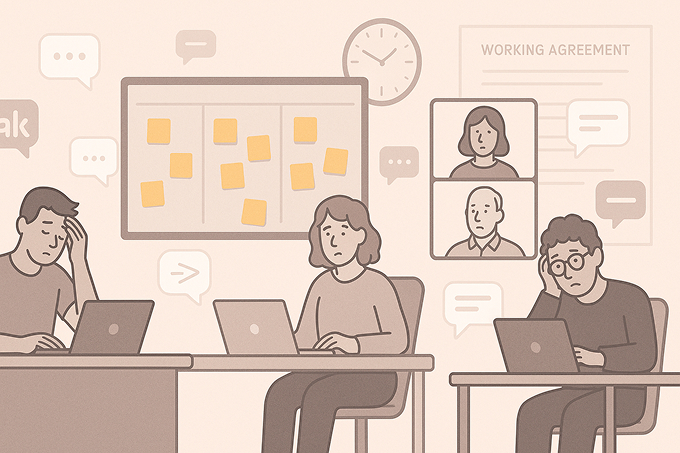
An Agile team working agreement is a short, practical document that captures the explicit rules we’ve chosen for how we work together every day. Not theory. Not corporate values. Just the behaviors we’re all saying yes to.
It usually covers things like:
- How and where we communicate (e.g., Slack, email, tickets)
- When we’re expected to be online or responsive
- How we treat meetings and focus time
- How code reviews, testing, and handoffs work
- How we make, record, and revisit decisions
A good working agreement is light, easy to read in a few minutes, and owned by the team. You write it together, adjust it together, and you’re allowed to change your mind as you learn with time.
How It’s Different From Other Documents
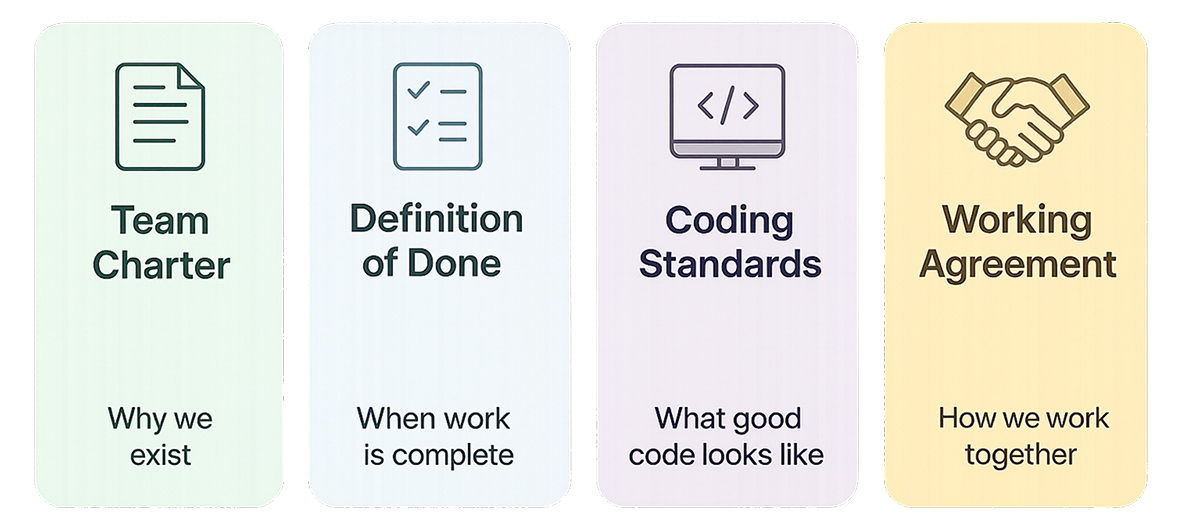
Agile teams have several artifacts, so it’s worth looking at them to identify how a team working agreement differentiates from the rest:
- Team Charter: Why the team exists and the outcomes it’s aiming for.
- Definition of Done: When a work item can be defined as truly finished.
- Coding Standards and Architecture Guidelines: What “good code” and “good design” look like for the project.
- Working Agreement: How we behave so that all of the above can actually happen without chaos.
Why Make It Explicit?
Every team has a working agreement. Most of the time, however, it merely exists in habits, side chats, and people’s heads. Writing it down gives it more prominence, leading to several positive outcomes, including:
- Shared expectations instead of assumptions
- Fewer personal conflicts (“we agreed to no meetings after 3 pm”)
- Faster onboarding for new joiners
- A safe place to tweak how you work during retrospectives
In short, a working agreement turns invisible norms into visible choices, and that’s the first step to improving them. Now, let’s look at the anatomy of a good working agreement.
Essential Components of a Modern Working Agreement (2026 Edition)
A modern working agreement focuses on the everyday habits that make collaboration smooth and build the team’s identity. These are the core elements most teams define:
1. Roles & Responsibilities
Clear ownership prevents confusion in defining who owns what. And some of these responsibilities may change based on the capabilities and capacities of the individuals in cross-functional teams:
- PO: Priorities, backlog clarity, acceptance of work
- Scrum Master/Delivery Lead: Ceremonies, flow, removing blockers
- Developers: Implementation, tests, documentation, code quality
- Designers/UX: Experience quality, timely design assets
- Tech Lead: Technical direction, feasibility, risk
2. Communication & Collaboration
Set expectations for how the team communicates:
- Channels: Slack/Teams for daily work; issue tracker for decisions; email for external updates. Sometimes, you may even go to the extent that all the task-related communication should be done in the team channel for better visibility
- Response Times: @name within a few hours; channel messages by the end of the day
- Decision Visibility: No DM-only decision summaries go to a shared channel or ticket
3. Availability & Time Zones
It’s important that teams can work together and have sufficient overlap. This is more valuable when you have team members across different time zones:
- Core collaboration hours (2-4 hours overlap)
- Meeting blocks and no-meeting focus windows
- How availability is shown (status, calendar)
- Simple handover notes for cross-time-zone work
- How to inform that you are going away from the seat for some time
4. Workflow & Quality
Align on how work moves and what “good” looks like:
- Story readiness: Clear AC, designs, dependencies
- PR rules: Size limits, reviewer count, review time
- Testing: Required test types before merge
- Deploy norms: Preferred windows, rollback steps, feature flags
5. Feedback & Conflict
Describe how the team handles tough conversations.
- Raise issues early in the right forum
- Give feedback with examples and good intent
- Time-box disagreements and escalate only when needed
- Once decided, the whole team commits
6. AI & Tooling
AI is part of daily work in 2026. Therefore, it’s important to establish guidelines for different activities in the software development life cycle:
- Allowed: Boilerplate code, tests, docs drafts, refactoring suggestions
- Not allowed: Secrets, customer data, sensitive configs
- Review: Flag AI-generated code in PRs and review carefully for correctness and security
Proven Working Agreement Examples for 2026
Example 1 – Scrum Feature Team (Hybrid)
Context
- 7-9 people: PO, Scrum Master, devs, QA, part-time UX
- B2B SaaS product, two-week sprints
- Hybrid team with a few hours of daily overlap
Agreement Highlights
Roles & Responsibilities:
- PO owns backlog, priorities, and accepting work.
- The Scrum Master owns ceremonies and flow.
- Devs own implementation, tests, and deployments.
- QA focuses on exploratory testing and quality risks.
- UX provides designs at least one sprint ahead for major features.
Communication:
- #team-feature is the main channel; decisions are summarized there or in tickets.
- During core hours: respond to @channel within 15 minutes, @name within 1-2 hours.
- Stand-up is strictly limited to 15 minutes, with a focus on flow and blockers.
Availability & Time Zones:
- Core hours: 10:00-15:00 overlap.
- Each person keeps a daily focus block (2-3 hours, no meetings).
- Time off or reduced hours are announced weekly in the channel.
Workflow & Quality:
- Stories meet the Definition of Ready before entering a sprint.
- Prefer 2- to 3-day stories.
- Small PRs with at least one reviewer, reviewed within one working day. Prioritize review before picking new tasks.
- Weekly (or more frequent) deploys, with feature flags for risky changes.
Feedback & Conflict:
- Issues raised in retro, standup, or 1:1-not in side complaints.
- Conflicts are time-boxed; escalate only if they block delivery.
AI & Tooling:
- AI used for boilerplate, tests, and docs drafts.
- AI-generated code flagged in PRs and carefully reviewed.
Example 2 – Product Trio (PO + Designer + Tech Lead)
Context
- Trio supports one or more delivery teams.
- Focused on discovery, shaping, and maintaining a 1-2 sprint runway.
Agreement Highlights
Decision-Making Model:
- PO owns the problem and outcomes.
- The designer owns UX quality.
- The Tech Lead owns the feasibility and technical risk.
- If they disagree, final say follows the nature of the decision (i.e., product, UX, or tech).
Discovery & Delivery Flow:
- Maintain a lightweight backlog of opportunities with problem, user, sketch, risks, and validation idea.
- Validate with users or data before committing work to teams.
Communication:
- Fixed trio syncs (e.g., twice-weekly shaping).
- Shared #product-trio channel for async work.
- No DM-only decisions; summaries go to the channel or doc.
Conflict & Feedback:
- Treat disagreement as missing information.
- Write down options and trade-offs; time-box, then decide or escalate.
- Short trio retro every couple of weeks on “how we’re working together.”
AI & Tooling:
- Use AI for copy variants, flow options, and draft experiment plans.
- Still rely on real user feedback and product metrics for final decisions.
Example 3 – Remote DevOps / Platform Team
Context
- 5-7 engineers, fully remote.
- Own CI/CD, infra, observability, and internal tools.
- Support multiple product teams across regions.
Agreement Highlights
On-Call & Incidents:
- Clear rotation and documented handover.
- Fast acknowledgement and first update in the incident channel.
- Blameless post-incident reviews with tracked follow-ups.
Change Management:
- Default to small, frequent changes.
- Manual production changes are rare, logged, and later automated.
- Avoid high-risk deploys right before weekends/holidays unless agreed.
Collaboration with Product Teams:
- Product teams own their alerts and first-level runbooks.
- Requests go via tickets or #platform-support, not DMs.
- Weekly office hours for design questions and debugging.
Communication:
- Dedicated incident channels for live issues.
- Support channel with an expected response time (e.g., within one business day).
- Monthly update on infra changes, deprecations, and upcoming work.
AI & Tooling:
- AI can draft infra code and runbooks.
- All AI changes go through review and non-prod environments before rollout.
Making Agreements Stick: Governance & Continuous Improvement
A working agreement only works if people actually use it.
- Store it where work happens: In the repo (/docs/working-agreement.md), Confluence, Notion, or your main team space. Define a single canonical version.
- Tie it to your rhythm: Add “Check the working agreement” as a standing retro item. When you change how you work, update the agreement immediately.
- Make updates easy: Let anyone propose changes via PRs, comments, or suggestions; no special ceremony needed. The team discusses, tweaks, and validates in retro.
- Review regularly: Do a quick scan at least once per quarter to ensure they’re still true and helpful. If not, delete or adjust. Treat it like code; refactor when it gets stale or noisy.
There are a few signals to help you determine whether your working agreement is working. One direct measurement is to have fewer repeated misunderstandings, smoother handoffs, and hardly any “how do we usually do this?” questions from new joiners.
Common Anti-Patterns (and How to Avoid Them in 2026)
Even if you have prepared your working agreement, some patterns silently kill it.
1. Laundry-list agreements
- Problem: Pages of rules nobody can summarize.
- How to fix: Keep it short and focused on high-friction topics. If nobody uses a section, delete or simplify it.
2. Top-down commandments
- Problem: “Here’s your working agreement,” handed down by leadership.
- How to fix: Use leadership guidance as constraints, but co-create the actual agreement with the team.
3. Vague, feel-good language
- Problem: Communicate well, respect each other, with no examples.
- How to fix: Turn values into behaviors: Respond to @mentions within a working day, no interruptions during standup, etc.
4. Set-and-forget documents
- Problem: Last updated two years ago, half the team is new.
- How to fix: Revisit in retros, especially after conflicts or process changes. Version it like you would any other living artifact.
Treat your working agreement as a small product that serves your team. If it’s simple, visible, and regularly updated, it will quietly remove friction rather than become another forgotten document.
FAQ
1. What is a Working Agreement in Agile?
A Working Agreement is a shared set of expectations that defines how the team collaborates-covering communication, decision-making, quality standards, and meeting norms. It helps reduce friction and increases accountability.
2. Why are Working Agreements important for Agile teams in 2026?
With hybrid work, distributed teams, AI-assisted workflows, and faster delivery cycles, clear collaboration rules matter more than ever. Working Agreements ensure transparency, predictable flow, and smoother handoffs in modern Agile environments.
3. How often should Agile teams review their Working Agreements?
Most teams revisit them at the start of every major project or every 2-3 sprints. A quick retrospective check ensures the agreement evolves with new tools, team members, and challenges.
4. Who creates the Working Agreement-the Scrum Master or the team?
The entire team creates it collaboratively.The Scrum Master simply facilitates; they don’t dictate rules. Shared ownership increases commitment and compliance.
5. Should Working Agreements include AI usage guidelines?
Yes – in 2026 most teams use AI for coding, documentation, testing, or backlog management.Clear guidelines help avoid misuse and ensure responsible, transparent collaboration.
Conclusion
Working agreements don’t solve every problem, but they eliminate one of the biggest: unspoken assumptions. When your team writes down how it communicates, collaborates, reviews code, works across time zones, and uses AI, you replace guesswork with clarity.
You don’t need a perfect document. Begin with your top three recurring issues, turn each into a clear behavior, and try it for a sprint. Update it when something feels off. Over time, the agreement becomes a living snapshot of how your team works at its best, easy to follow and adjust, and invaluable for new joiners.
In a world where hybrid work, distributed teams, and AI tools are normal, relying on “we’ll figure it out as we go” is no longer enough. A simple, well-maintained working agreement gives your team the shared foundation it needs to move faster and avoid everyday friction.