A freeze period usually shows up near a release, though the reason is rarely the same from team to team. One group might be trying to stabilize a risky branch before launch. Another is protecting a customer migration weekend. Yet another may be due to poor release discipline, which needs a hard stop before things spread further. JetBrains defines a code freeze as a period during which no new code is introduced, allowing the team to focus on stabilization, testing, and debugging before a release or milestone.
That basic definition still applies in 2026. What has changed, however, is the way teams use it. In smaller services with solid automation, a long freeze often feels like a sign of weak delivery flow. In larger products, shared platforms, regulated systems, or high-risk cutovers, a freeze window still earns its place. Microsoft’s cloud adoption guidance still recommends a change freeze before major deployment activity, with clear start and end times and explicit communication across teams.
Why Teams Still Use Them
The goal isn’t to halt engineering work just for control, but to simplify by reducing the number of moving parts.
Right before release, teams are often dealing with the worst mix of conditions. Open pull requests, half-finished fixes, late QA findings, last-minute config changes, and pressure from product or leadership all pile up. A freeze gives the team a boundary. Work stops expanding. Existing issues get resolved. Release blockers move to the front.
This matters because release risk usually stems from accumulation, not from a single dramatic bug. A harmless UI patch, a quick dependency bump, and a small config tweak are all manageable on their own, but put them into the same late-stage branch, and the story changes.
What Usually Changes During the Freeze Window
A healthy code freeze process is narrow and explicit. Teams that keep it vague usually spend the whole period debating exceptions.
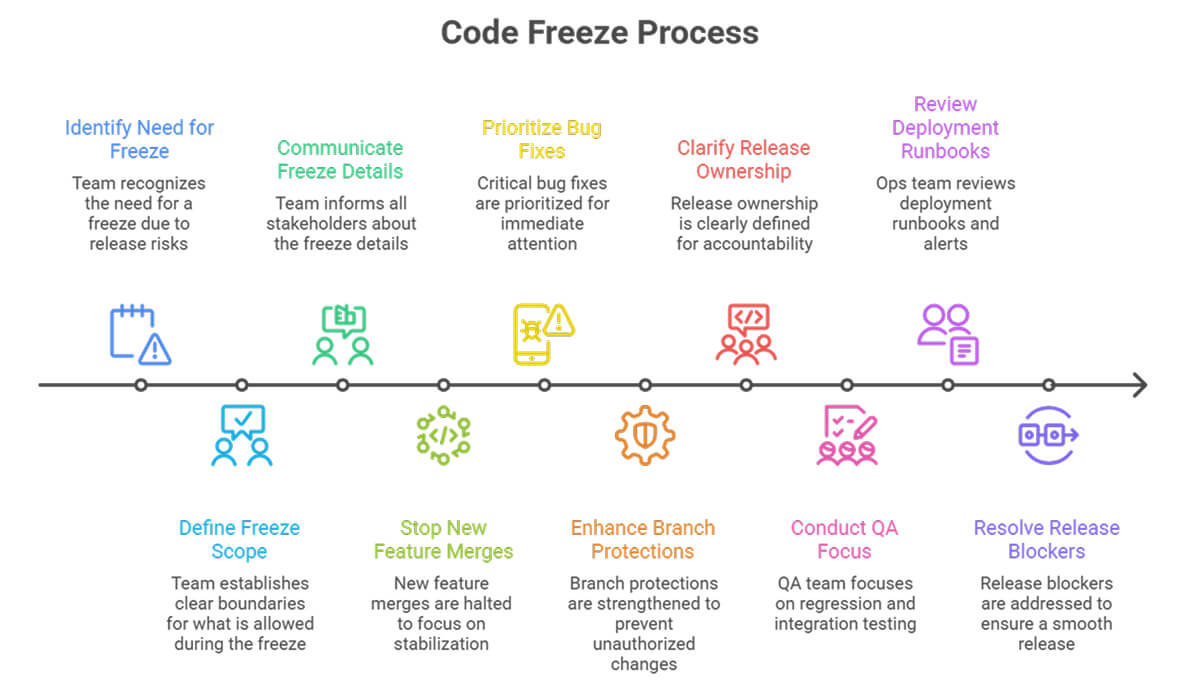
Most teams tighten the following areas:
- New feature merges stop.
- Only critical bug fixes are included in the release branch.
- Security fixes follow a fast approval path.
- Branch protections get stricter.
- Release ownership becomes clear.
- QA focuses on regression, integration, and rollback checks.
- Ops or platform engineers review deployment runbooks and alerts.
When done well, this process is “boring.” Everyone knows what is blocked, what’s still moving, who approves exceptions, and what counts as a release blocker. That removes a lot of side noise.
Where Teams Get it Wrong
The first mistake is starting too late. If the branch is already unstable, the freeze turns into a panic phase. Nobody trusts the build. Exceptions pile up. People bypass the review because the deadline feels close.
The second mistake is freezing without reducing the scope. If product expectations stay the same, engineers end up doing quite a bit of feature work under the guise of bug fixing. That damages the branch and the trust around the process.
The third mistake is treating every issue as urgent. A freeze only works when the bar for inclusion stays high. Critical defects belong in the window. Cosmetic fixes usually do not.
I have seen teams create more trouble by opening the gate too often than by holding a defect for the next cycle. The late release branch is a bad place for indecision.
Code Freeze in Software Development Today
Modern delivery practice has changed the role of this pattern. Teams with strong CI, feature flags, solid observability, and staged rollout habits need shorter stabilization windows than teams shipping large batches through shared release trains. JetBrains notes that continuous deployment reduces the need for long freeze periods, though stabilization windows still make sense before major milestones.
That is why the discussion around code freeze in software development is less about whether freezes are good or bad. The better question is: what problem is the team trying to solve?
If a team needs a code freeze every sprint, the delivery system likely has a structural issue. Weak test coverage, oversized pull requests, poor branch hygiene, weak ownership, or unstable environments are usually the cause. If the team uses one before a major code release involving data migration, customer impact, or high operational risk, that is a different case.
A Useful Rule
Use a code freeze when the cost of a late change exceeds the cost of a delayed change.
While that may sound obvious, it still helps. Release weekends, infrastructure cutovers, contractual milestones, and high-visibility launches often meet that rule. Routine product work usually does not.
There is also a service reliability angle. Atlassian’s guidance on DevOps-style support notes that when uptime drops below acceptable targets, launches freeze until teams restore service health. That is less about ceremony and more about operational discipline.
Final thoughts
A freeze period is not, by itself, a sign of maturity. Some teams need one because the release is large and the risk is real. Some teams need one because the delivery system is rough around the edges.
The useful part of a code freeze is the clarity it provides. What stops. What still moves. Who decides. What gets fixed now, and what waits. When those answers are clean, the release tends to be cleaner too.
