Feature flags allow teams to modify application behavior without needing a separate code branch or full rollout. When the code goes live, the feature stays hidden or limited until the team turns it on. This makes release work less rigid and enables testing new behavior in production with more control.
That control is the main reason teams keep using them. A release no longer needs to mean full exposure. You ship the code, keep the flag off, verify the system, then expose the feature to a small audience first. If something looks wrong, you switch the flag off instead of hastening to a rollback.
What Feature Flags Solve
A lot of release pain comes from bundling too many decisions into one moment. Code merge, deployment, exposure, and business launch all occur together. If one part goes wrong, the whole release feels unstable.
Feature flags separate those steps.
That helps in a few common situations:
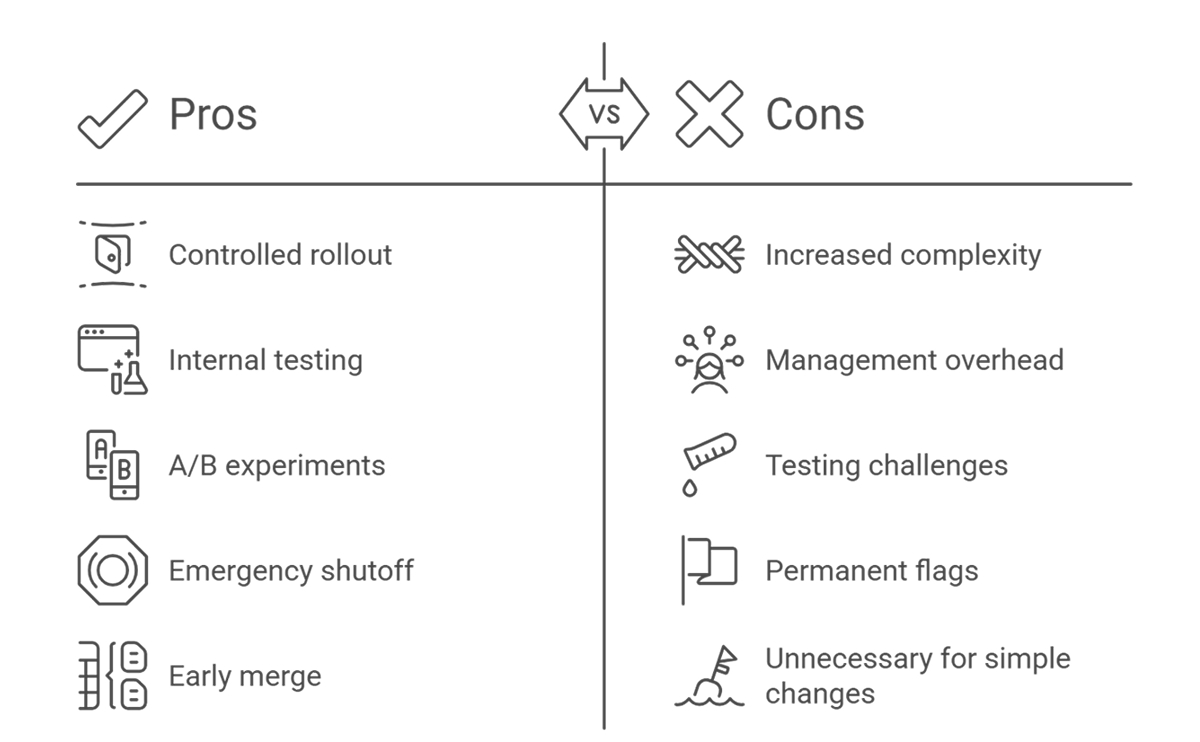
- Gradual rollout to a small percentage of users
- Internal testing in production
- A or B experiments
- Emergency shutoff for risky features
- Early merge of unfinished work that stays hidden
- Region or tenant-specific behavior
This is why feature flagging became common in teams that release often. Smaller deployments are easier to reason about. Exposure stays under tighter control. Teams get more room to react before a problem spreads.
How They Work in Practice
A flag usually wraps a code path. If the flag is on, users get the new behavior, and if it’s off, they get the old one. That sounds simple, but the tricky part is not the if statement. The tricky part is the life around it.
A team needs to know who owns the flag, why it exists, who is exposed to it, and when it should be removed. Without defining those basics, flags pile up, and the codebase gets messy fast.
A typical flow looks like this:
- Build the feature behind a flag.
- Deploy to production with the flag off.
- Turn it on for internal users or a limited group.
- Watch logs, metrics, support signals, and failure rates.
- Expand exposure in stages.
- Remove the flag after the rollout is complete.
That last step matters more than people think. When removing a flag, be sure to eliminate its code, update related tests, and notify the team. Aged flags are a form of debt. They create extra code paths, more testing work, and add confusion during debugging.
Where Feature Flag Deployment Helps Most
Feature flag deployment works best when the release risk is real, and the team wants a safer rollout path. A checkout change, a pricing rule update, a new onboarding flow, or a service migration are all good examples.
It is also useful when product timing and engineering timing do not fully match. Engineering finishes the work on Tuesday. The business wants to launch on Friday. With a flag, the code can reach production earlier, while exposure stays under control.
This also helps when support or operations teams want a calmer launch window. A staged rollout gives them time to watch for strange patterns before all users see the new path.
The Operational Risks
Flags reduce one kind of risk, though they add another. Every flag creates more system complexity.
Now the team has more states to think about:
- Flag on
- Flag off
- Partial rollout
- Different conduct across users or tenants
- Interaction between multiple active flags
This is where teams start running into trouble. A bug may only show up when two flags are active together. A support engineer may not know which user segment is seeing the new path. A test suite may pass for the default path but miss the flagged path entirely.
Feature flag management keeps this from turning into release chaos. Teams need naming rules, ownership, expiry dates, and a review process for flag cleanup. Without that, flags become permanent fixtures.
Good Habits Around Flags
A few habits make a big difference:
- Name flags clearly.
- Keep one owner per flag.
- Write down why the flag exists.
- Set a note.l date or review date.
- Avoid nesting or using too many flags in a single flow.
- Test both active and inactive paths where it matters.
- Remove feature flags after rollout ends.
Cleanup is the point where many teams slip. Temporary flags stay in the system for months. New engineers stop trusting what is really live. Debugging gets slower because every issue starts with a flag audit.
Feature flags are useful. Permanent flag sprawl is not.
When Not To Use Them
Not every change needs a flag. Small, low-risk fixes usually do not need one. Simple copy changes often do not need one either. If a team wraps every minor change in a flag, the cost outweighs the control.
The better question is simple: Does this change need staged exposure, hidden release, or a fast shutoff path? If the answer is no, a flag may be unnecessary.
Final Thoughts
Feature flags give teams a cleaner way to release with less exposure risk. They make launches more flexible and let teams respond faster when production behavior doesn’t match expectations.
But they also add complexity. Used well, they support safer releases. Used poorly, they slow teams down and harden the codebase.