What is the actual ROI of investing in Claude Code for my development team?
Written by

Status
answered
Written by
Status
answered
Most teams do not struggle to justify trying an AI coding tool. The harder part is figuring out whether it is actually paying for itself a month or two later.
That answer is usually not found in prompt counts or in broad claims about speed. It shows up in the shape of the work: fewer stalled tickets, faster first drafts on repetitive tasks, and less context switching when engineers are working through unfamiliar code.
Many teams evaluate a coding assistant as if engineers spend most of the day writing new business logic. That is rarely true. Much of the week goes into reading old code, tracing side effects, fixing tests, updating internal APIs, cleaning up migrations, and dealing with glue code.
That is where a Claude AI coding assistant earns its keep. Not by replacing design work or senior judgment, but by cutting down low-leverage effort around them. If a team already has decent review habits and test coverage, the ROI question becomes simple: Does the tool reduce time spent on necessary work that adds little real value?
The best results usually come from routine engineering work with enough structure to guide the model and enough friction to waste human time.
This is where ROI analysis gets sloppy. People see a fast answer from the tool and assume time was saved. Sometimes it was. Sometimes the engineer still had to verify the change, rewrite the output, or undo part of it because it missed local conventions.
A cleaner way to measure Claude Code’s effect on productivity is to separate assisted output from accepted output. If the assistant drafts a patch in five minutes but review and cleanup add thirty, the win disappears. This is also where teams start needing better delivery visibility, and Milestone can help connect GenAI adoption to workflow data, team usage patterns, and actual ROI instead of anecdotes.
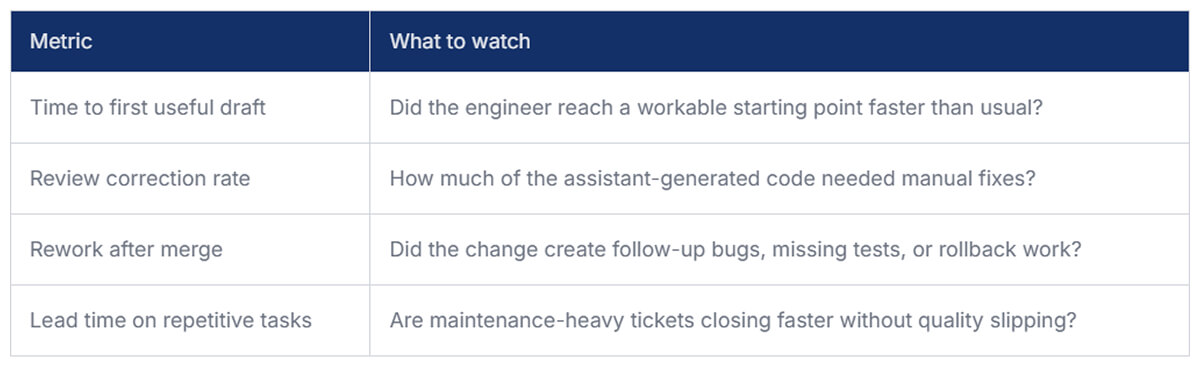
Even lightweight reviews every couple of weeks can reveal whether the tool is saving effort or just moving it around.
Licensing matters, but it is rarely the full cost. Teams also pay in onboarding time, prompt experimentation, security review, and the hidden drag of bad usage habits. A common failure mode is loose Claude Code usage with no agreed boundaries. Engineers start using it for everything, including work where the model has poor context or where small mistakes are expensive.
The teams that get value usually narrow the lane. They define where the assistant is useful, where review must stay heavy, and where it should not be used at all. Successful teams that employ Claude Code tend to:
Not every engineer will benefit equally from the same Claude Code developer tools. A senior engineer focused on architecture or incident analysis may only see modest gains. A mid-level engineer handling maintenance work across an unfamiliar monolith may get a lot more.
That is why blanket rollout numbers can be misleading. If ten people adopt the tool and only four get daily value, the investment can still make sense. The mistake is forcing uniform Claude Code usage expectations across workflows that are very different.
For a normal product engineering team, the believable upside is not dramatic. It is more like shaving friction off recurring work. A few hours back, per the engineer, each sprint can justify the spend, especially on teams with a heavy maintenance load.
If the tool reduces onboarding time, speeds up repetitive change sets, and lowers the cost of working in messy parts of the codebase, that is already meaningful.
The return on Claude Code is rarely found in flashy demos. It shows up in ordinary engineering work that gets done with less drag. If your team wants a real answer, measure the accepted output, the review burden, and the time saved on repetitive tasks. That will tell you more than adoption numbers ever will.


