Have you ever thought about how popular streaming platforms like Netflix allow thousands of users to watch 4K videos simultaneously without buffering?
The secret is throughput-how many transactions your application processes per second.
Whether launching an e-commerce sale or streaming live video, maximizing throughput ensures your software doesn’t buckle under pressure. This guide dives deep into throughput testing, TPS performance testing, and actionable strategies to measure and optimize throughput.
What is Throughput Testing?
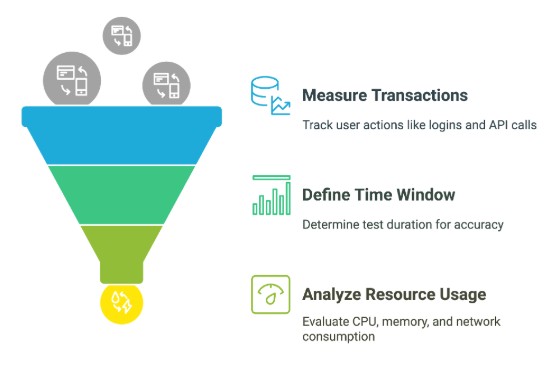
Throughput testing measures how many transactionsper second (TPS) a system completes. For example, a banking app might track how many payments it processes during peak hours. Key metrics include:
Transactions processed: User actions like logins, API calls, or database queries.
Time window: Test duration (e.g., 5 minutes vs. 1 hour).
Resource usage: CPU, memory, and network consumption.
“Throughput testing isn’t just about speed-it’s about sustainable performance under real-world stress.”
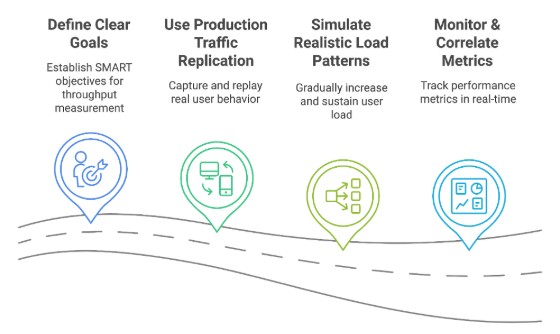
Specific: Measure checkout API throughput during peak loads.
Measurable: Define the appropriate TPS count based on your requirements (e.g., target 2,000 TPS with <100ms latency).
Achievable: Align with current infrastructure (e.g., 10-node Kubernetes cluster).
Relevant: Focus on user-critical paths (e.g., payment processing).
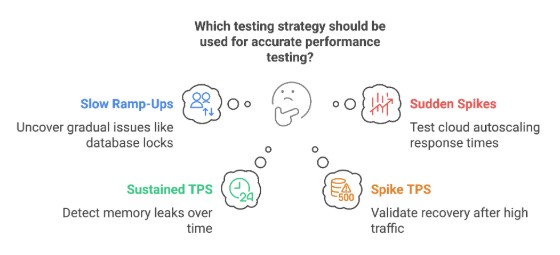
Time-bound: Test in 30-minute intervals to simulate real-world spikes.
2. Use Production Traffic Replication
Replicating actual user behavior is critical. Tools like Speedscale simulate production traffic in Kubernetes, mimicking actual usage patterns. For example:
Record traffic: Capture API calls, database queries, and user sessions from production.
Replay traffic: Simulate 10,000 concurrent users using historical data.
Isolate dependencies: Use automatic mocks for third-party services (e.g., payment gateways).
Example: A ride-sharing app replayed a 24-hour traffic snapshot to test surge pricing algorithms.
Speedscale: Replays production traffic in Kubernetes with automated mocks.
Best Practices
Test in staging & production: Staging identifies most issues, while production uncovers unexpected real-world scenarios.
Automate tests in CI/CD: Run hourly tests for critical services (e.g., payment gateways).
Document everything: Document test configs, results, and fixes.
Common Pitfalls & Fixes
Testing with stale data: Use fresh, anonymized production data.
Ignoring third-party APIs: Mock dependencies to avoid rate limits.
Overlooking network delays: Test in multi-region setups (e.g., AWS us-east vs. eu-central).
Wrapping Up
Organizations can confidently scale their applications by implementing structured throughput testing while maintaining excellent user experience. Start with clear metrics, implement appropriate testing tools, analyze results against business requirements, and apply targeted optimizations. This systematic approach to measuring and improving throughput will deliver maximum results for your applications and users.