What are the 5 pillars of code quality?
Written by

Status
answered
Written by
Status
answered
Code quality has become an important metric of modern software development. It ensures code is easy to understand, runs efficiently, and is simple to maintain, helping teams save time and collaborate smoothly.
In this article, we’ll explore the five pillars that define code quality standards. Each of these pillars fosters an environment where code is not only easier to manage but also performs well.
Code quality measures how well code is written and how effectively it performs. It ensures that software is maintainable, efficient, scalable, and usable. Code quality can be categorized into two parts:
Tools like SonarQube, ESLint, or Prettier can help enforce coding rules and keep your work neat. Regular code quality analysis and reviews are also key to catching mistakes early.
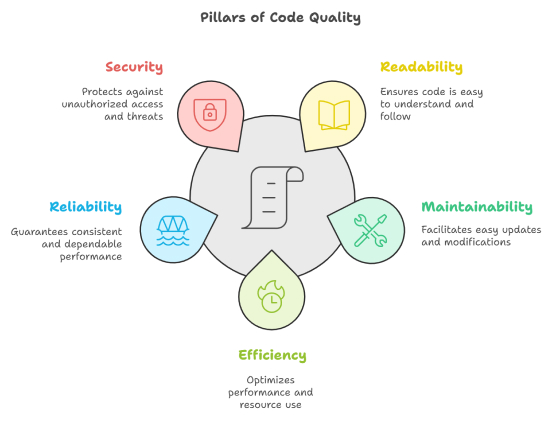
Readable code is the foundation of quality software. It ensures that other developers can easily understand your code. Here’s what makes code readable:
# Bad
x = 1500
y = 22.5

# Good
total_sales = 1500
average_temperature = 22.5# Bad
function greet(name){return "Hello, "+name+"!";}
# Good
function greet(name) {
return "Hello, " + name + "!";
}Tools like Prettier or Black can automatically format code to maintain consistency.
Maintainable code is easy to work with and adapt. It allows you to make changes or fix issues without breaking other parts of the code. Here are a few best practices you need to follow:
// Bad: Duplicate code
function calculateArea(length, width) {
  return length * width;
}
function calculateRectangleArea(length, width) {
  return length * width;
}

// Good: Reusable code
function calculateArea(length, width) {
  return length * width;
}Efficient code minimizes using resources like memory, CPU, and bandwidth while delivering optimal performance. But make sure they maintain the balance between efficiency and reliability.
# Naive (O(n^2))
def find_largest(numbers):
    for number in numbers:
        if all(number >= x for x in numbers):
            return number

# Optimized (O(n))
def find_largest(numbers):
return max(numbers)Reliable code works as expected in all situations. It handles errors well and stays consistent, giving users confidence in its performance. Here is how to make your code reliable:
try:
    result = 10 / 0
except ZeroDivisionError:
print("Cannot divide by zero!")Secure code protects your application from vulnerabilities and attacks. It ensures sensitive data stays safe and your software remains trustworthy. Here are steps to improve security:
// Prevent SQL Injection
const userInput = "'; DROP TABLE users; --";
const query = SELECT * FROM users WHERE name = ? ;
db.execute(query, [userInput]); // Use parameterized queriesHigh-quality source code is more than just a technical requirement. It’s what distinguishes great software from average. No matter how big or small an application or a system is, these principles will assist in constructing solid code and make your job significantly easier.