Blackbox AI
Apr 21, 2026
IBM’s article on black-box AI concerns the general AI concept, in which users can see inputs and outputs but not the model’s internal reasoning, which differs from Blackbox AI, the developer tool discussed here. While many AI coding tools feel similar, Blackbox AI is positioned less as a simple chat assistant and more as an agent platform that works across the CLI, IDEs, VS Code, remote agents, mobile, builder, and API access, aiming to support the full development workflow.
At its core, Blackbox AI is an AI development platform built for code generation, debugging, refactoring, and agent-based execution. The company’s homepage describes it as a platform for enterprise-grade AI agents with access to both frontier and open-source models, and its docs show that the product now spans browser, terminal, IDE, API, mobile, and remote execution. That matters because the modern developer workflow is fragmented. Some work happens in VS Code. Some happens in the terminal. Some happens in pull requests. Some happens in quick experiments. Blackbox AI is clearly trying to cover all of that, not just autocomplete.
You can also think of Blackbox AI as a coding assistant that has grown into a broader automation layer. The CLI documentation says it can take plain-English instructions, make a plan, write code, manage files, and help with debugging loops. That pushes it beyond “suggest the next line” territory.
When people look at Blackbox AI features, the important question is not how many features the platform has. It is which ones actually help during real development work. Blackbox AI is clearly trying to cover more than just code suggestions, and a few features stand out because they affect how developers build, debug, compare, and ship work.
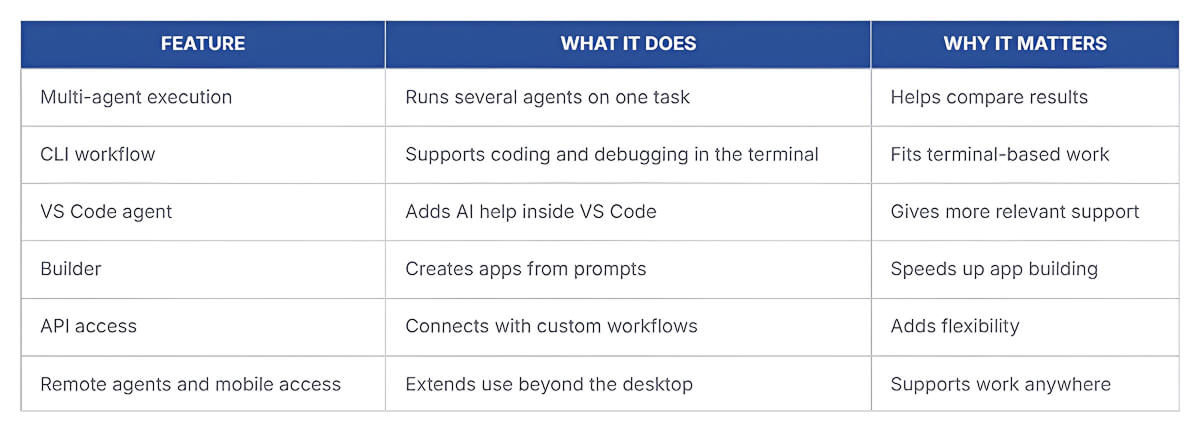
Taken together, these features show that Blackbox AI is not only trying to help with writing code. It aims to support a broader engineering workflow across the editor, terminal, and app-building process, which makes the platform more interesting than a basic coding assistant.
The broad answer is both individual developers and larger organizations. Blackbox AI’s public site says teams at Fortune 500 companies depend on the platform, and it prominently displays logos from Microsoft, Amazon, Google, Intel, Oracle, SAP, Cisco, and Salesforce. Its enterprise documentation also makes it clear that the product is aimed at organizations ranging from startups to large companies with compliance and security requirements.
That gives the tool two audiences. One is the everyday developer who wants help inside VS Code, the terminal, or the browser. The other is the engineering organization that wants centralized billing, collaboration, security controls, support, and deployment flexibility.
The strongest answer is not just “it has AI for code.” Many products can say that now. What makes Blackbox AI stand out is its effort to turn AI coding into a multi-surface, multi-agent workflow. It is not only about generating code in a chat window. It is about running competing agents, comparing outputs, using the terminal directly, building apps visually, and extending the same system via an API. That is a bigger ambition than standard autocomplete.
For a developer, that makes the product more interesting than a simple assistant. For a team, the platform is worth watching because it aims to cover workflows, not just suggestion quality.
If you want, I can also turn this into a more polished publisher-style version with a stronger intro and conclusion, while keeping the same structure and keywords.
If you are evaluating Blackbox AI seriously, do not stop at “it feels fast.” Measure the boring things. Those usually tell the truth.
A few useful measurements are:
These are the numbers that show whether the tool is actually reducing friction or just creating impressive demos.
Where Blackbox AI can improve a workflow is straightforward. It can shorten the path from idea to working code, especially for repetitive implementation tasks. It can also reduce context switching by keeping AI help in the editor, terminal, browser, and even on mobile.
For teams, the multi-agent model is interesting because it offers a comparative workflow rather than forcing a single generated answer as the default. That can lead to better decisions, not just faster ones. This is partly an inference from how the product is structured, but it is a reasonable one based on the features Blackbox AI is publicly emphasizing.
Blackbox AI keeps its pricing fairly simple. At the time of writing, the platform lists three main paid plans plus an enterprise option.
For most individual developers, the lower tiers cover everyday use, while larger teams may consider Enterprise for features such as SSO, security controls, and on-premises deployment.
Blackbox AI is not just another autocomplete tool trying to sit inside the editor. It is building a broader development workflow around agents, code assistance, and multi-surface access across IDEs, terminals, browsers, and more. For developers and teams looking for AI support beyond simple code suggestions, it’s a tool worth paying attention to.

Mutable AI is worth paying attention to because it goes beyond the usual AI coding story. Yes, it supports autocomplete.
Last updated Apr 23, 2026 Details
Continue.dev is worth watching because it shows where developer tooling is headed.
Last updated Apr 23, 2026 Details
