Mintlify
Apr 21, 2026
Mintlify sits in a useful spot between docs-as-code and a managed documentation product. It gives teams a hosted docs site while keeping content close to Git, MDX, and standard engineering workflows, rather than pushing everything into a separate publishing stack.
That matters because most teams do not struggle to write a good docs page. They struggle to keep API references, product guides, previews, edits, and review history moving without turning documentation into its own infrastructure project. Mintlify is built around that exact problem, with browser editing, Git sync, preview flows, API playgrounds, analytics, and AI features all integrated into the same system.
Mintlify is a documentation platform for developer docs, knowledge bases, and help centers. In practical terms, your content lives in a repository as MDX files, Mintlify builds and hosts the site, and updates can come from either your Git workflow or its web editor.
This is not just a static theme or a Markdown renderer. As a documentation tool, it is closer to a full delivery system for docs: deploy the site, connect a repository, edit locally or in the browser, review changes, and publish without separately setting up hosting, previews, API reference rendering, or usage analytics. There is also a CLI for local preview and validation, which makes it easier to keep documentation work in the same loop as code review.
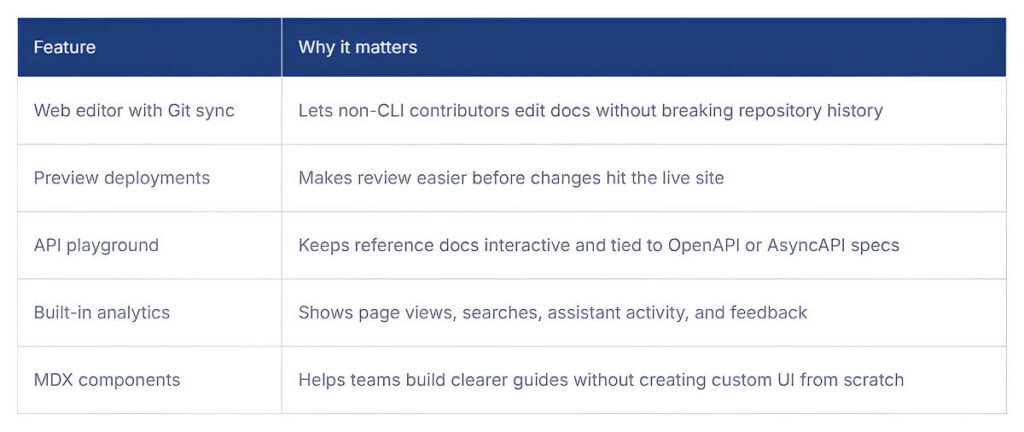
The most useful parts are those that reduce maintenance friction. Mintlify supports Git sync and MDX content, a web editor with visual editing and live preview, OpenAPI- and AsyncAPI-based API playgrounds, built-in analytics, a REST API, and a library of MDX components for code groups, steps, tabs, callouts, and API pages.
Mintlify is used by teams that publish external developer docs at scale and cannot afford stale reference pages. Its official customer list includes Anthropic, Coinbase, HubSpot, Zapier, Vercel, PayPal, Replit, Fidelity, Laravel, Perplexity, X, and Worldcoin. The product is positioned for developer documentation, knowledge bases, and help centers rather than a small internal wiki.
In real workflow terms, the best fit looks like platform teams, API teams, developer relations groups, and product teams that need docs to move with releases. Smaller teams can still use it, but the payoff is clearer when multiple people touch docs, previews matter, and documentation is treated as part of product delivery rather than a side task.
What stands out is not just Mintlify AI documentation, but also how those assistant and workflow features fit into a Git-based publishing system that teams are already using. Plenty of products now say that.
The key distinction is that Mintlify treats documentation as content read by both humans and machines, while keeping the source of truth in a repository and the publishing flow tied to review. Its assistant can answer questions with citations, its agent can propose pull requests, its workflows can run on schedules or in response to repository events, and its API can trigger updates or export analytics.
There is also an important nuance regarding Mintlify’s open-source philosophy. The hosted platform itself is commercial, but Mintlify maintains public GitHub repositories, including its docs and starter kits under MIT licenses, and runs an OSS Program that gives qualifying non-commercial open-source projects access to Pro for free. So the open-source story is real, just not in the sense of the full managed platform being open source.
The useful question is not whether the docs look nicer. It is whether the system makes documentation easier to keep accurate and easier for users to navigate. Mintlify’s own analytics and feedback tooling are built around that kind of measurement.
Mintlify looks solid for teams that already work comfortably with Git-based docs, but it could still make adoption easier for smaller teams or those with less mature documentation workflows. The biggest improvement areas are onboarding clarity, clearer visibility into AI-driven changes, and making it easier to understand which plan fits which type of team.
Mintlify offers three main plans, with savings of up to 15% on yearly billing.
Mintlify is most useful for teams that treat documentation as an integral part of product operations, not as a side website. It provides a managed system for publishing, reviewing, measuring, and updating docs without sacrificing repository-based workflows. For a small project with basic static pages, it may be overkill. For API-heavy teams and fast-moving developer products, it makes much more sense.

Mutable AI is worth paying attention to because it goes beyond the usual AI coding story. Yes, it supports autocomplete.
Last updated Apr 23, 2026 Details
Continue.dev is worth watching because it shows where developer tooling is headed.
Last updated Apr 23, 2026 Details
