Pieces for Developers
Apr 21, 2026
Pieces for Developers occupies an odd but useful place. It is part snippet manager, part AI assistant, and part memory layer for the work you do across your machine. The value is less about generating one more block of code and more about not losing the trail of what you were doing an hour ago or last week.
That makes it easier to think of as a workflow tool rather than a chat tool. If you spend most of your day jumping between docs, tabs, terminals, and editor windows, that distinction matters.
Pieces for Developers is a desktop-centered developer productivity tool built around PiecesOS and its Long-Term Memory engine. PiecesOS runs locally, handles core processing, and powers features such as memory, conversational search, and context access across the broader Pieces ecosystem.
In practice, that means the tool remembers your working context, not just your saved snippets. It can track code, documents, links, summaries, and activity history, and then let you search or ask questions about that history later. That is what makes Pieces for Developers feel different from a typical note-saver or code clipboard.
Among the developer-focused features, the most useful are those that reduce rework. Not flashy features. Just the ones that help you get back to the right file, the right discussion, or the right snippet without rebuilding context from scratch.
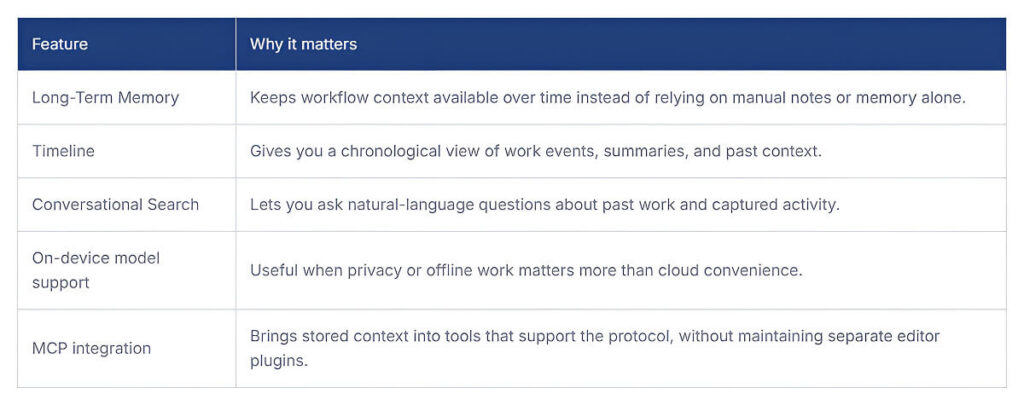
One practical detail is that Pieces is moving away from dedicated plugins toward MCP, which speaks volumes about how it approaches developer context management. That shift matters because the product now looks less like an editor add-on and more like a local context service that other tools can query.
The official docs cast a fairly wide net. They mention front-end developers, data scientists, DevOps engineers, and students, which makes sense since the product is not tied to any one language or IDE. It is more about recovering context across mixed workflows than about specializing in a single stack.
I can also see it fitting people who do a lot of research-driven engineering. That includes developers who spend half their day reading docs, comparing implementation options, and switching between code and discussion threads. The product pages emphasize reducing context switching and carrying the same chats and materials across tools, which is a pain most experienced developers already know well.
The unique part is not that it has AI. Every tool in this category says that. The more specific difference is that Pieces captures context at the OS level and then uses that captured history inside search, summaries, and chat. The docs explicitly frame the copilot around your real workflow across tools, not just the file currently open.
That changes the kind of help it can offer. While a normal assistant can answer a coding question, a Pieces AI developer workflow tries to answer a question based on what you were actually working on, what you opened, what you saved, and what you were discussing. When that works, it is genuinely more useful than generic prompting. When it does not, it still depends on how cleanly the tool captured the context in the first place.
A useful way to measure Pieces is not by how many snippets it stores. It is whether it actually helps you get back to useful context faster and with less manual effort.
The product looks strongest when memory and context retrieval are doing most of the work. The rougher edges seem to be around transition and clarity.
Pricing is fairly simple. The main factor is whether you only need local capabilities or want longer memory, premium models, and broader cloud-backed features.
Pieces for Developers is most interesting when you stop thinking of it as a code generator and treat it as a context system. That is where the tool feels more grounded.If your daily work is fragmented across code, docs, browser research, and team discussion, it solves a real problem. If you mostly want inline code completion, its most advanced features may be more than you need.

Mutable AI is worth paying attention to because it goes beyond the usual AI coding story. Yes, it supports autocomplete.
Last updated Apr 23, 2026 Details
Continue.dev is worth watching because it shows where developer tooling is headed.
Last updated Apr 23, 2026 Details
