GitHub Copilot is now among the most widely deployed AI tools in enterprise engineering. Most large organizations don’t have a Copilot adoption problem; they have a Copilot proof problem. Licenses are rolled out, usage dashboards show activity, and acceptance rates look healthy. Yet none of that tells leadership whether the spend is actually paying off.
This is a significant gap. A team might use Copilot constantly and still not deliver faster, because the time saved on writing code is absorbed elsewhere, such as in review queues, in testing, or in cleaning up code that doesn’t quite fit the codebase’s conventions.
If that’s happening, the organization hasn’t gotten faster. It’s just moved the cost of AI from “writing” to “fixing,” and that cost is usually invisible until someone goes looking for it.
To properly measure GitHub Copilot productivity, you can’t just look at usage. You have to connect what’s happening inside the editor to what’s happening across your delivery pipeline. That’s what Milestone is built to do.
GitHub Copilot: Overview and Stats
GitHub Copilot is the most broadly deployed AI coding assistant in the enterprise, integrated directly into the IDE and tightly connected to the GitHub ecosystem. It’s typically rolled out top-down through enterprise licensing programs that span hundreds or thousands of developers across multiple teams, business units, and codebases.
That scale is exactly why measurement is hard. Copilot itself can tell you how many suggestions were shown and accepted, but it has no visibility into what happens after that, including whether the accepted code passed review cleanly, how long the resulting change took to reach production, or whether it created downstream rework.
At enterprise scale, those questions can’t be answered by looking at any single tool. They require GitHub Copilot metrics that connect Copilot activity to your Git history, your PR workflows, and your delivery timelines, which is where Milestone comes in.
What Milestone Measures for Copilot Teams
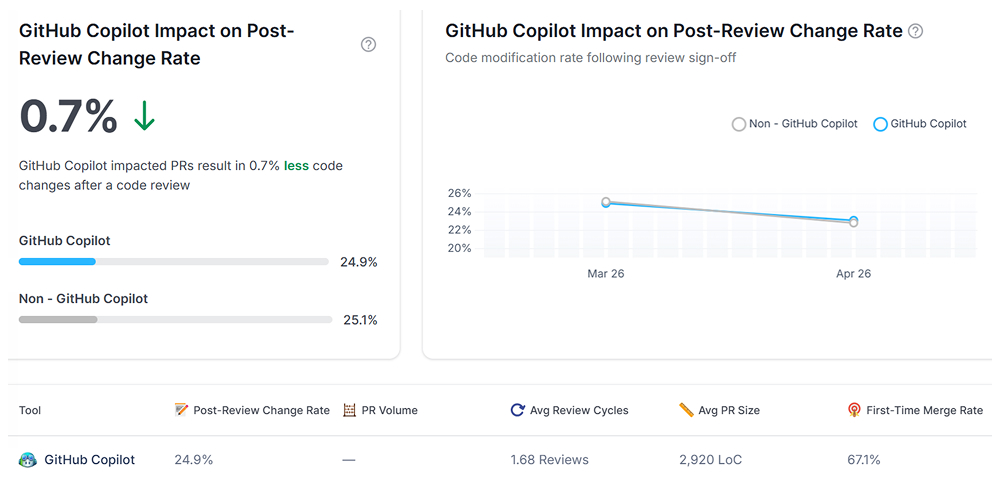
For organizations running Copilot at scale, the central question isn’t “are people using it?” – it’s “did the investment improve outcomes?” Milestone is built to answer that by looking at three things.
1. Adoption, as a starting point, not an endpoint
Most enterprise Copilot rollouts produce a wide spread of usage – a smaller group of developers using it heavily and effectively, and a much larger group using it for light autocomplete or barely at all. Milestone shows you where that split falls across teams and business units, so you can see where adoption is translating into real workflow change and where it’s closer to shelfware.
2. True velocity, benchmarked against your own baseline
The question that matters to a CFO isn’t how many suggestions were accepted. It’s about whether features are moving from a ticket to production faster than before Copilot. Milestone compares Copilot-assisted work against your historical, non-AI baseline, so you can see whether GitHub Copilot productivity gains are real or whether the speed is being absorbed somewhere else in the pipeline.
3. Code stability, so gains don’t get erased downstream.
If Copilot-assisted code consistently needs significant rework after review, any time saved during writing is being spent again, usually by your most senior people. Milestone tracks rework and churn on Copilot-influenced code, so quality issues are visible before they become a pattern across teams.
This combination is what lets engineering leaders move from “we bought licenses and people seem to like it” to “here’s where Copilot is generating measurable value, and here’s where it isn’t yet.”
The Metrics That Matter for ROI
When it’s time to justify Copilot ROI or decide whether to expand it, these are the numbers that hold up under scrutiny:
- Post-Review Change Rate (PRCR): The percentage of Copilot-assisted code that gets meaningfully rewritten after a human reviews it. A low PRCR means Copilot is helping your developers write code that holds up. A high one means you’re generating more code, not more progress.
- Lead Time for Changes: The total time from first edit to successful merge, compared against your pre-Copilot baseline. This is the most direct way to see whether delivery is actually faster.
- Senior Dev Bandwidth: Whether your most experienced engineers are getting time back for architecture and higher-value work, or absorbing the cost of reviewing and fixing Copilot-assisted code.
- Cost-per-Feature: Connects license and engineering cost to what’s actually shipped — the number that ultimately answers “was this worth it?“
Comparing Teams, Not Just Tracking Usage
One of the most useful things Milestone does for large Copilot deployments is to let you compare. Different teams, different business units, different adoption cohorts, all using the same tool, often with very different GitHub Copilot metrics as a result.
That comparison is where the real insight is. If one team has figured out how to use Copilot in a way that consistently improves velocity without hurting code stability, that’s a workflow worth understanding and spreading.
If another team shows high usage but no movement on lead time or PRCR, that’s worth investigating too, not as a blame exercise, but to understand what’s different about how the tool is being used, prompted, or integrated into their process.
This is also where Milestone extends naturally beyond Copilot. Many organizations run Copilot alongside tools like Claude code for more agentic workflows, or Cursor on specific teams. Milestone gives you a single dashboard across all of them, so budget and tooling decisions can be made based on actual data rather than on which tool has the most internal buzz.
If you want to know whether your GitHub Copilot rollout is delivering real ROI, book a demo with Milestone.
FAQs
1. How does Milestone measure GitHub Copilot’s ROI?
Milestone connects Copilot activity to your Git history, PR workflows, and delivery data, then compares Copilot-assisted work against your historical baseline. Tracking metrics like Lead Time for Changes and cost-per-feature shows whether Copilot is genuinely shortening your delivery cycle or just increasing code volume without improving outcomes.
2. What productivity metrics does Milestone track for Copilot users?
Milestone tracks Post-Review Change Rate (PRCR), Lead Time for Changes, code stability and churn, senior developer bandwidth, and cost per feature. Together, these metrics distinguish between teams that generate real GitHub Copilot productivity improvements and those that generate more code without a corresponding gain in throughput or quality.
3. Can Milestone show Copilot adoption rates across different engineering teams?
Yes. Milestone breaks down adoption by team, business unit, and individual usage patterns, showing where Copilot is being used effectively versus where it’s underutilized or limited to basic autocomplete. This helps leaders identify which teams have found effective workflows worth sharing more broadly.
4. How does Milestone compare Copilot-assisted developers against non-Copilot baselines?
Milestone benchmarks velocity, code stability, and review metrics for Copilot-assisted work against your organization’s own historical, pre-Copilot data. This baseline comparison makes it possible to determine whether Copilot is actually accelerating delivery, rather than relying on assumptions based solely on suggestion acceptance rates.
5. Can I track GitHub Copilot and other AI tools in Milestone at the same time?
Yes. Many organizations run Copilot alongside Cursor, Claude code, or other AI coding tools, often across different teams or use cases. Milestone provides a single dashboard to compare adoption, productivity, and ROI across all of them, supporting data-driven decisions about where to expand or scale back investment.
