AI Workflow Automation Tools: Measuring ROI and Engineering Impact
8 min read• Jun 03, 2026
Written by

Milestone Team

Engineering teams have moved beyond treating AI in delivery workflows as a side experiment. What began as code suggestions in the editor now extends to pull request reviews, test generation, deployment checks, runbook support, and incident response. The more important question is no longer whether these systems are interesting, but whether they improve delivery in measurable ways.
That question matters because engineering teams are under pressure from both directions. Leadership expects faster delivery and greater efficiency, while engineers want less repetitive work and fewer handoff problems between tools. If automation is genuinely useful, it should show up in delivery speed, system stability, and team capacity. That is why ROI needs a more disciplined view. The real task is to connect automation to clear engineering outcomes such as time saved, quality, throughput, failure rates, and operating cost.
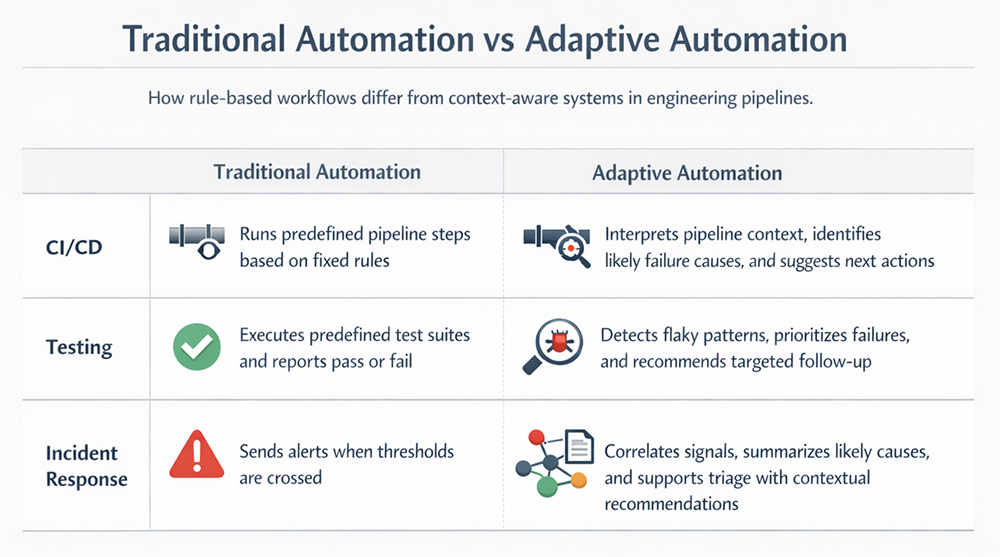
At a practical level, AI-powered workflow automation means using models to help software systems make or support decisions inside an engineering workflow, rather than just executing a fixed script. Traditional automation is rule-based. If condition A happens, do action B. That works well when inputs are predictable and edge cases are limited.
AI changes the shape of the problem. Instead of only following static rules, the system can classify, summarize, generate, prioritize, or recommend based on context. In engineering, that often means handling messy inputs that were previously left to humans.
A few examples make the distinction clear:
The important point is that this is not magic, and it is not fully autonomous in most teams. In real systems, the useful pattern is bounded automation. Let the model reduce search time, remove repetitive work, and improve routing. Keep high-risk approvals, production changes, and policy decisions under human control.
This is where the technology becomes valuable in engineering. It can support CI/CD, code generation, test creation, deployment review, documentation, support triage, and incident response without pretending that every step should be delegated to a model.
Most engineering pipelines still follow a familiar lifecycle: develop, build, test, deploy, and monitor. The real value of automation is not that it appears in each stage, but that it reduces friction between them.
In development, AI workflow automation can support code suggestions, refactoring, boilerplate generation, and test scaffolding. In build and test, it can classify failures, detect patterns, generate missing tests, and route work more effectively. In deployment, it can summarize release risk, validate changes, and flag unusual rollout behavior. In monitoring and operations, it can help with alert grouping, incident timelines, and runbook lookup.
This is also where AI tools for developer workflow automation become more useful than isolated assistants. A tool inside the IDE may help one engineer, but a workflow-aware system can improve the full path from commit to production by reducing delays and rework.
The best integrations usually happen inside the systems teams already use. GitHub Copilot can review pull requests in GitHub. GitLab Duo works across the GitLab delivery lifecycle, including the IDE, UI, and CI/CD workflows. Amazon Q Developer works in IDEs and on the command line, keeping assistance close to real engineering tasks.
A simple example is test failure triage. A commit triggers CI; the job fails; the automation identifies the likely issue, compares it with recent failures, and posts a short diagnosis on the pull request. That does not replace engineering judgment. It removes waste between systems.
This is where many teams lose discipline. They adopt a tool, engineers say it feels helpful, and leadership assumes the value has already been proven. In practice, ROI is difficult to isolate.
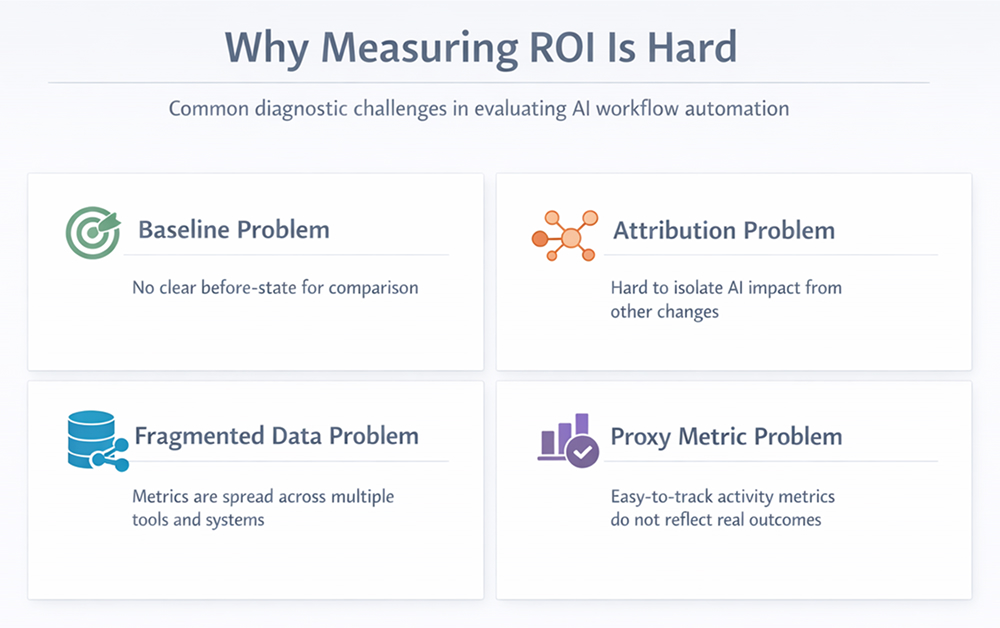
The first issue is baseline quality. If you do not know your previous lead time, review time, test failure investigation time, or incident recovery time, then you cannot credibly measure improvement.
The second issue is fragmentation. Delivery data is usually spread across repositories, CI systems, ticketing tools, incident platforms, and observability tools. Google’s Four Keys work makes this problem explicit: deployment, change, and incident data often live in different systems, which makes consistent measurement hard unless you build a workflow-level view.
The third issue is attribution. A team might ship faster after adopting automation, but the real cause could be smaller batch sizes, better test isolation, or team reorganization. AI is rarely the only variable in motion.
The last issue is metric quality. Developer activity counts are tempting because they are easy to collect. But commits, pull requests, and message counts are weak proxies for engineering value. The SPACE framework is a useful reminder that developer productivity is multidimensional and should not be reduced to a single metric.
So the hard part is not collecting more numbers. It is choosing measurements that reflect real outcomes.
In engineering, ROI is broader than cost savings. It includes any measurable gain that improves delivery capacity, quality, or reliability relative to the cost of introducing and operating the automation.
A workable model usually has four dimensions:
A simple high-level model looks like this:
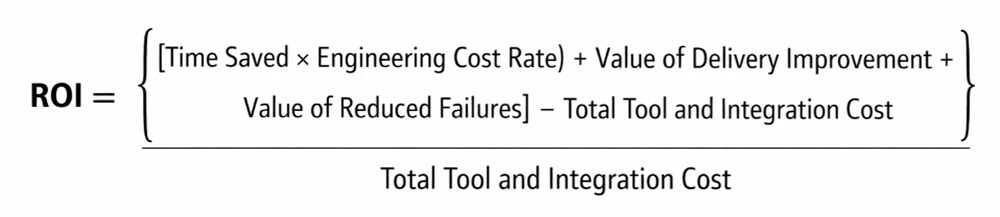
It is not perfect, but it forces the right conversation. You are not only asking whether the tool is smart. You are asking whether the workflow is better.
There are a few ways to measure this without creating a research project:
Pick a workflow with a clear boundary, such as PR review, flaky test triage, or incident summary generation. Measure its current performance for four to six weeks, then compare after rollout.
Roll out to one or two teams first. Keep a similar team as a comparison group if possible. This helps reduce the problem of every variable changing at once.
For some tasks, you can compare two versions of the workflow. One uses automation, one does not. This is especially useful for review summaries, ticket classification, or support triage.
Do not measure the assistant in isolation. Measure the full path. If review comments are generated faster but merge time does not improve, the workflow did not actually get better.
A good example is a release review. Suppose an automated check summarizes risky dependency updates, missing migration steps, and test gaps before deployment. The direct value is the time saved in review. The indirect value is fewer bad releases and less recovery work. The indirect value is often more significant.
DORA’s standard delivery metrics are still a good anchor here because they connect software delivery performance to throughput and stability: lead time and deployment frequency represent throughput, while change failure rate and time to restore service represent stability.
If you want to know whether automation is improving engineering work, start with metrics that reflect the health of the delivery system.
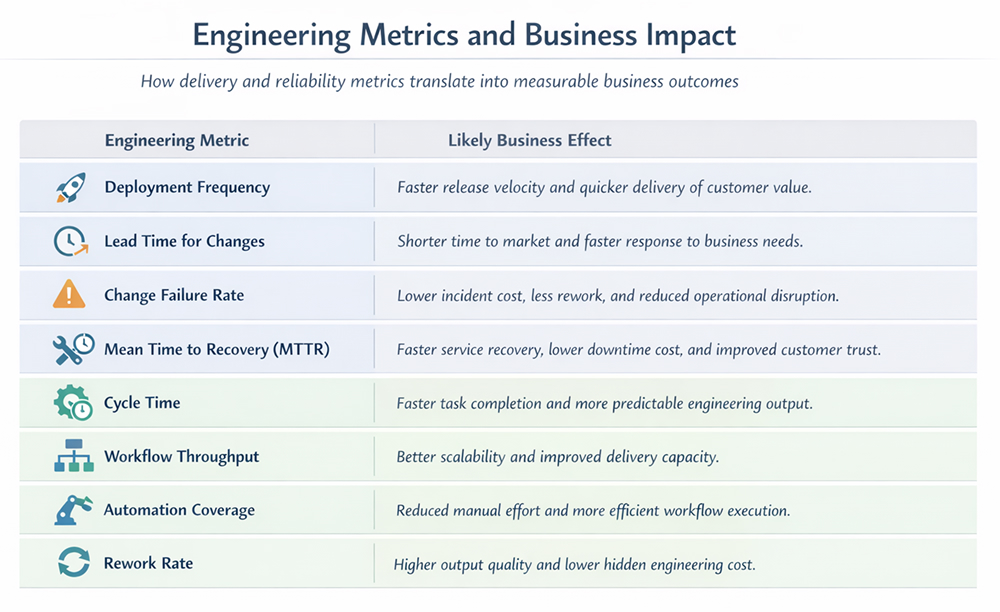
Use these carefully. Cycle time, task completion speed, and selected review-time metrics are helpful when tied to a real workflow. Raw output counts are less trustworthy. More commits do not automatically mean better delivery, and more generated code may simply mean a later increase in review burden. The SPACE framework is useful here because it argues for a broader view of productivity than just activity counts.
A few system-level measures are especially helpful:
These map directly to ROI. Faster lead time means faster value delivery. Lower failure rate means less costly disruption. Better automation coverage means less manual coordination. Lower rework means the automation is not simply moving work to a later stage.
A simple rule is to automate only when the path, cost, and outcome are already sufficiently visible to measure.
Workflow automation is valuable when it improves the engineering system, not merely when it produces clever output. The strongest implementations reduce repetitive work, improve delivery flow, and help teams recover faster when things go wrong. That is why ROI should be measured at the workflow level, using time, quality, throughput, and stability together rather than isolated tool activity. For teams seeking to make that measurement more practical, platforms such as Milestone can help connect workflow visibility, delivery metrics, and automation outcomes into a more usable evaluation model.
Start with one workflow, not the whole organization. Measure baseline time, error rate, review effort, and delivery speed before rollout. Then compare after adoption using workflow-level outcomes such as lead time, rework, and incident cost. ROI is strongest when savings, quality gains, and delivery improvements are measured together.
The most useful indicators are lead time for changes, deployment frequency, change failure rate, mean time to recovery, cycle time, and workflow rework rate. These show whether automation is helping teams move faster without harming stability. Activity counts alone are not enough and can easily be misinterpreted.
The best fit usually depends on your existing system of record. Tools tend to integrate best when they live inside the platforms engineers already use, such as the IDE, repository, merge request flow, CI runner, or command line. Current examples include GitHub Copilot, GitLab Duo, and Amazon Q Developer.
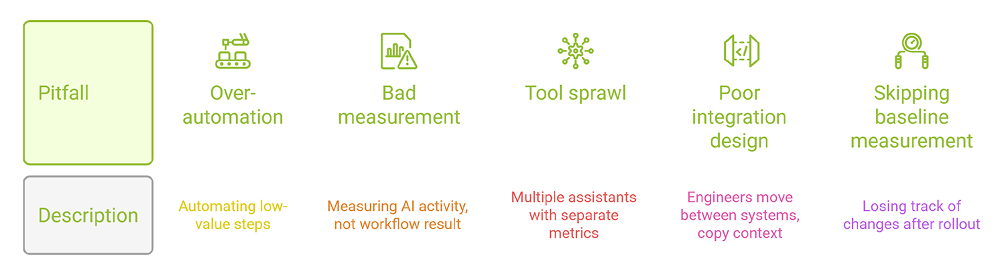
Common failures include skipping baseline measurement, automating low-value work, trusting weak productivity proxies, and adding too many disconnected tools. Another frequent problem is poor integration design, where engineers spend more time managing automation output than benefiting from it. Good adoption is usually narrow, measurable, and staged.
Sign up to our newsletter
By subscribing, you accept our Privacy Policy.
