GenAI did not enter engineering teams through a single, clean procurement plan. It arrived through IDE extensions, chat tools, review assistants, test generators, and small team experiments.
That is not always a problem. Engineers need room to test tools on real work. The trouble starts when no one can say which tools are in use, which workflows they affect, or whether they are worth the money. R&D leaders need an AI adoption framework that keeps useful experimentation alive without letting every team build its own disconnected tool stack.
What Is Multi-Tool GenAI Use?
Multi-tool GenAI use means engineering teams rely on more than one AI tool across software delivery. One tool may help with code completion. Another may review pull requests. A third may draft tests, summarize tickets, or explain an old service that nobody wants to touch.
This usually happens because the work is different from team to team. A backend engineer working on a payment service does not have the same needs as a QA engineer building regression coverage or a platform engineer writing migration scripts.
So the goal is not to pretend one assistant will handle everything. It usually will not. The goal is to know where the tools sit in the workflow, what they are allowed to touch, and what value they are expected to create.
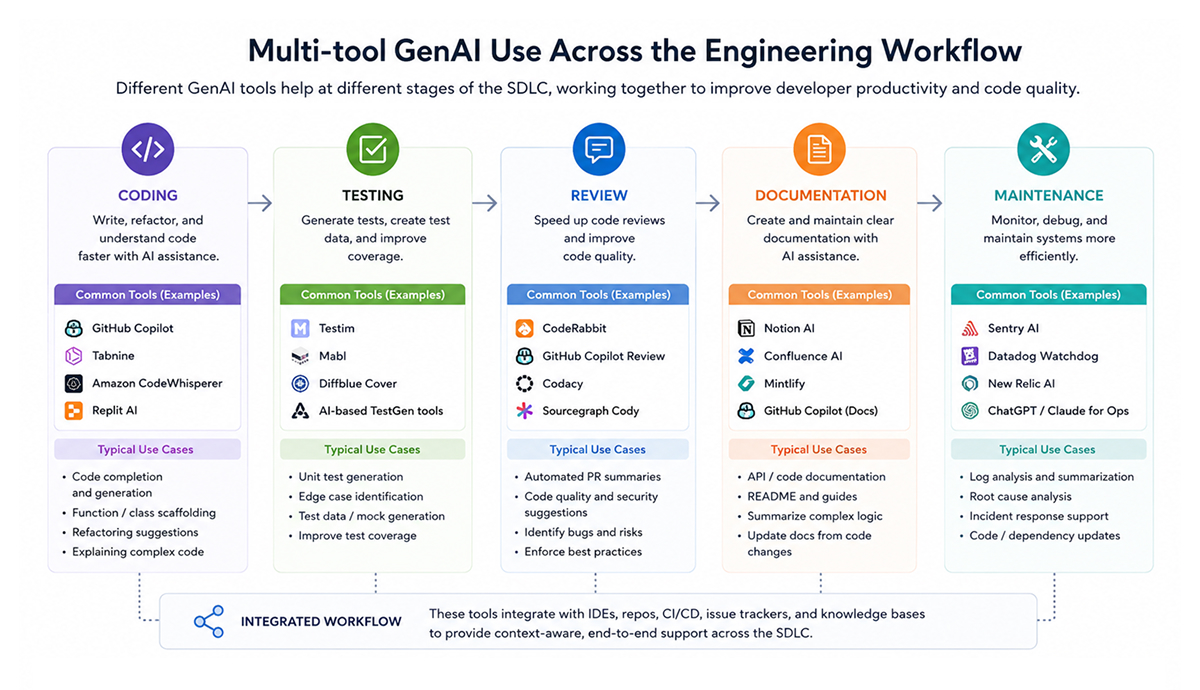
Where GenAI Fits Across the R&D Lifecycle
GenAI can support many parts of the R&D lifecycle, but its value is not uniform across all stages. Some tasks are low-risk and repetitive, while others are closer to production behavior, customer data, or infrastructure decisions.
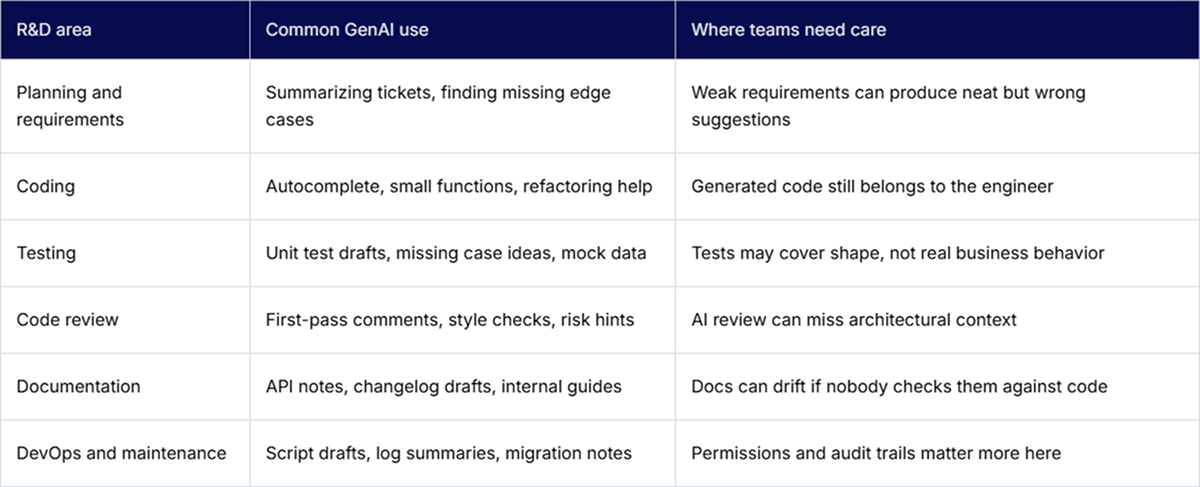
Different teams will still choose different tools. That is normal. A team working in a large monorepo may care about repository context. A mobile team may care more about IDE support. A QA team may want better test generation. The decision should be intentional, not just whoever installed something first.
Why AI Tool Sprawl Happens
Tool sprawl rarely starts as a formal decision. It starts with useful shortcuts. A developer tries a tool and likes it. A lead approves a few seats. Another team picks a different tool because it works better with their stack. Security reviews one product. Procurement approves another. Six months later, the company has overlapping tools, unclear ownership, and no clear view of usage.
These are common AI adoption challenges:
- Two or three tools solving almost the same engineering problem
- Bottom-up experiments with no named owner
- Different teams using different success criteria
- Security reviews taking place after the tools are already in use
- No clear rule for source code, secrets, customer data, or internal docs
- Paid seats that nobody checks after the first month
- Workflow changes that are never measured properly
The tooling is visible, so people blame the tooling. But the real issue is usually the management structure. Who approves the tool? Who owns the policy? Who decides whether the pilot worked? Who retires it when it does not? Without the answers to those questions, sprawl keeps growing quietly.
The Hidden Costs of Unmanaged GenAI Use
The monthly license is the easiest cost to see. The harder costs are the ones spread across engineering, security, finance, and team leads.
A tool may be cheap per user, but still expensive in practice. Someone has to review access. Someone has to connect it to repositories or CI. Someone has to answer developer questions. Someone has to check whether it creates noisy pull requests, weak tests, or rework for senior engineers.
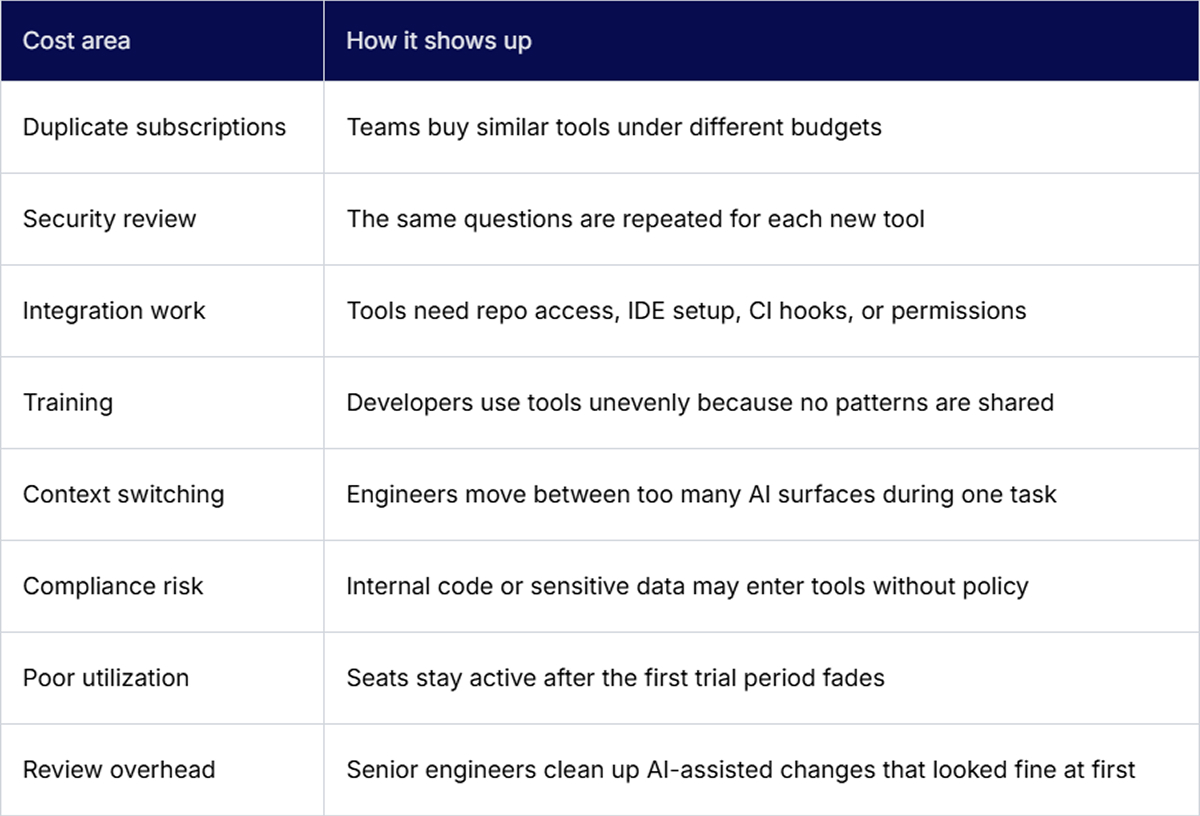
This is where enterprise AI adoption can get messy. The tool may help one team move faster, while another team spends more time reviewing, correcting, or explaining generated work. If leaders only look at spend or seat count, they miss that tradeoff.
Building a Governance Model Without Blocking Innovation
Governance should not mean every new tool request disappears into a three-month approval queue. That is how shadow usage starts. Engineers will still look for tools that help them get work done.
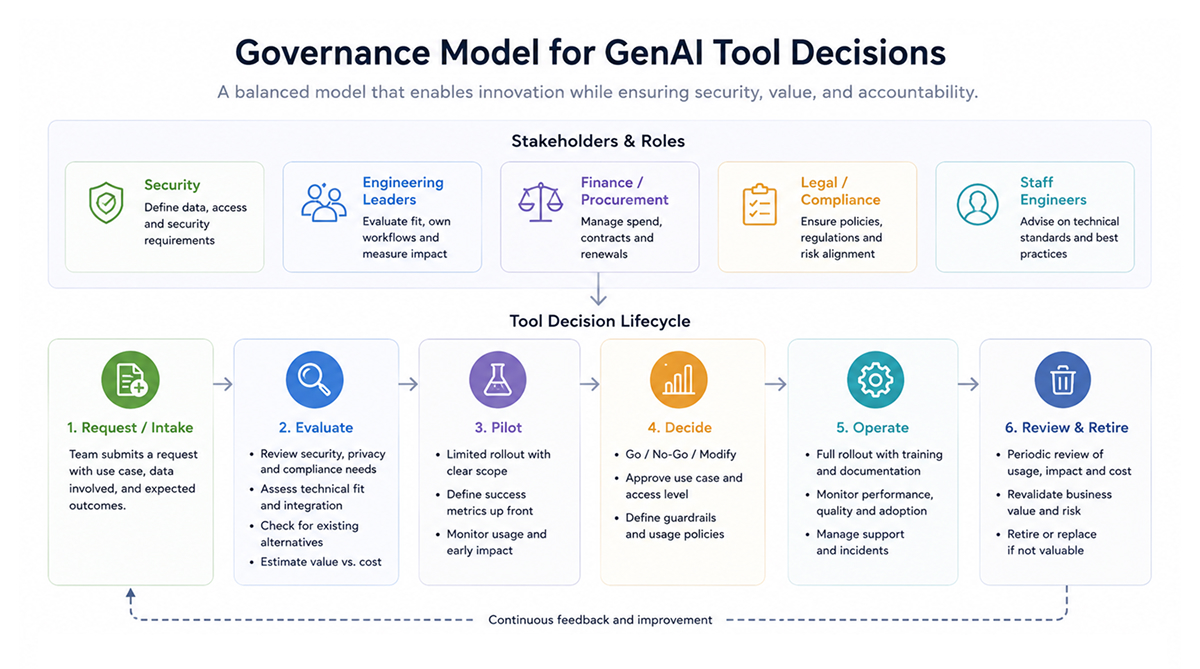
A healthier model gives teams clear lanes. For example, coding assistants, test-generation tools, code-review tools, documentation helpers, and workflow automation tools can each have different rules. A code completion tool used on internal services may not need the same process as an agent that can open tickets, call APIs, or touch deployment scripts.
The policy also needs owners. Security should define data and access rules. Engineering should assess the workflow fit. Finance and procurement should monitor renewals and duplication. Staff engineers should help determine whether a tool improves real work or just creates cleaner demos.
A practical governance model usually covers:
- Approved and restricted use cases
- Rules for source code, secrets, customer data, and internal documents
- A lightweight intake path for new tools
- Pilot criteria before a team starts using the budget
- Renewal checks based on active usage and impact
- A clear owner for each tool category
This keeps the process usable. Teams can still test tools, but they do it inside boundaries that everyone understands.
Measuring GenAI ROI in Engineering Workflows
ROI measurement weakens when it is overly broad. “Developers are faster” is not enough. Faster at what? Writing a first draft? Getting a pull request merged? Fixing flaky tests? Understanding a legacy module?
Useful measurements start within the workflow. Pick a few places where GenAI is actually being used. Then look at what changed before and after adoption. Review time, cycle time, test quality, rework, incident trends, and active usage all matter more than a generic productivity claim.
Tools like Milestone can help here by showing where GenAI is being used across engineering workflows, how adoption is changing team performance, and whether the spend is producing measurable ROI.
Leaders should also review AI adoption statistics from their own environment. Public reports can be useful background, but internal data is what tells you whether your teams are getting value or just adding another layer of tooling.
Key Metrics That Show Whether GenAI Is Helping or Hurting
No single metric tells the full story. PR throughput can go up while quality drops. Cycle time can improve because teams are merging smaller changes, not because AI helped. Developers may also often use a tool, but only for low-value tasks.
The better approach is to mix delivery, quality, adoption, cost, and developer experience.
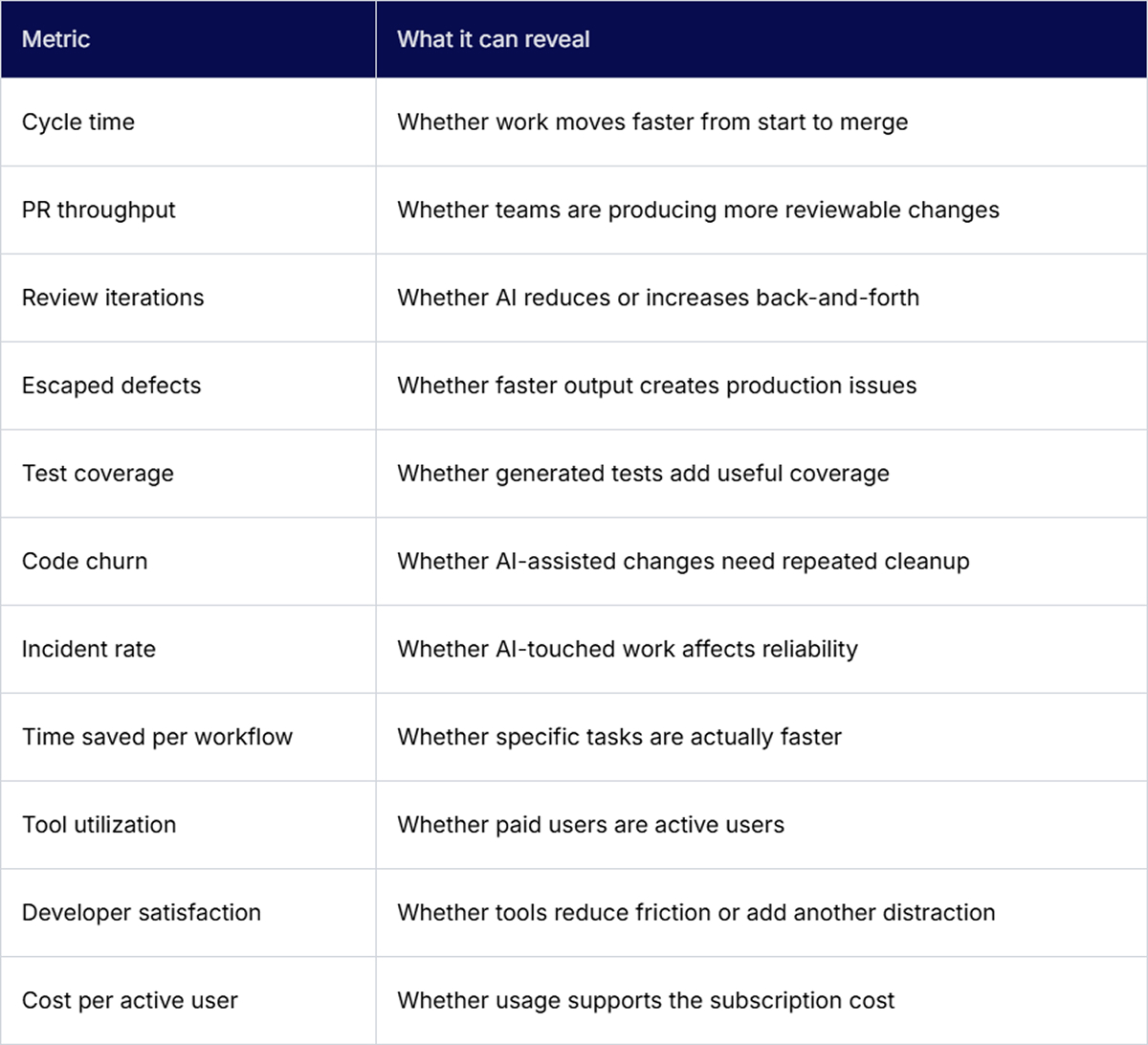
Keep the first dashboard small. A bloated metrics view often becomes another thing nobody trusts. Start with the workflows where AI is used most, then add more only when the data helps make a decision.
Creating a Scalable Adoption Framework
A scalable framework should be boring enough to use. If it looks like a policy deck written for a steering committee, engineers will work around it.
Start with a plain inventory. Which tools are already in use? Which teams use them? Are they paid or free? Do they touch repositories, tickets, documents, customer notes, or deployment systems? This first pass often uncovers tools that leaders did not know were active.
From there, define the use cases with some judgment. Code suggestions for an internal service may be allowed after a normal security review. Summarizing customer data may need stricter controls. Letting an autonomous workflow change production infrastructure should probably wait until ownership, audit logs, and approval paths are mature.
A usable framework can follow this order:
- Map current tool usage across teams, repos, workflows, and paid seats.
- Define approved use cases for coding, testing, review, documentation, and automation.
- Set evaluation criteria before pilots begin, not after people already like the tool.
- Standardize governance around data access, security, ownership, and procurement.
- Run pilots with measurable goals tied to real engineering workflows.
- Train teams on safe usage, review expectations, and common prompting patterns.
- Monitor ROI using workflow, quality, adoption, and cost signals.
- Clean up the portfolio by expanding useful tools and retiring weak ones.
The cleanup step matters. Many teams are good at adding tools and bad at removing them. A portfolio review every quarter or two can catch duplicate tools, unused seats, and pilots that never turned into measurable value.
Conclusion
Multi-tool GenAI use is not going away. Engineering work is too varied for a single tool to meet every need cleanly.
The risk is letting the tool stack grow without ownership, measurement, or guardrails. That turns a useful engineering capability into another source of cost, review noise, and workflow confusion.
Good AI adoption does not need a heavy process. It needs enough structure to know what is being used, where it helps, where it creates risk, and when a tool should be expanded or removed.
FAQs
1. How do you measure GenAI ROI when teams use multiple AI coding tools?
Start with the workflows, not the vendor list. Compare cycle time, review effort, defect trends, test quality, active usage, and cost before and after adoption. A tool that helps one team draft code faster may still increase review load elsewhere, so look at the full path to the merge.
2. What are the hidden costs of multi-tool AI adoption beyond subscription fees?
The extra cost usually sits in security review, procurement, training, integration, support, and duplicated licenses. There is also an engineering cost. If AI-assisted changes create noisy PRs, shallow tests, or repeated cleanup work, senior engineers pay for that time during review.
3. Which metrics indicate whether multi-tool adoption is helping or hurting engineering productivity?
Watch cycle time, PR throughput, review iterations, code churn, escaped defects, incident rate, useful test coverage, active usage, and developer feedback are effective metrics for determining this. Read them together. A faster merge rate is not a win if production issues rise or reviewers spend more time correcting generated code.
4. How do you build an AI tool strategy that balances standardization with developer choice?
Standardize the rules, not every small workflow. Define approved tool categories, data access limits, security requirements, and evaluation criteria. Then let teams choose from approved options when their stack or workflow needs differ. That keeps flexibility without sacrificing visibility or cost control.