AI agents are easy to prototype. A team connects a model to a few tools, asks it to inspect a ticket or summarize logs, and receives a useful-looking answer. For a demo, that may be enough.
Production engineering needs more care. The workflow has to be reliable even when inputs are messy, observable when failures occur, and safe when the agent interacts with systems, data, or customer-facing work. That is why teams need structured agentic workflow design patterns rather than a single large prompt that tries to handle every task.
Good patterns do not remove engineering judgment. They make the agent’s work easier to control. You can see where a decision was made, what context was used, which tool was called, and where a human should step in.
What Are Agentic Workflows?
Agentic workflows are AI-powered systems that can plan steps, use tools, evaluate results, and adapt their next action based on what they find. They are different from a simple prompt-response flow because the model is not only generating text. It is helping move a task through a workflow.
A production example is an incident alert. The agent may read the alert, review recent deployments, retrieve logs, query metrics, compare errors, and suggest a possible next action. A safer setup lets the agent prepare the recommendation but waits for an engineer before executing anything.
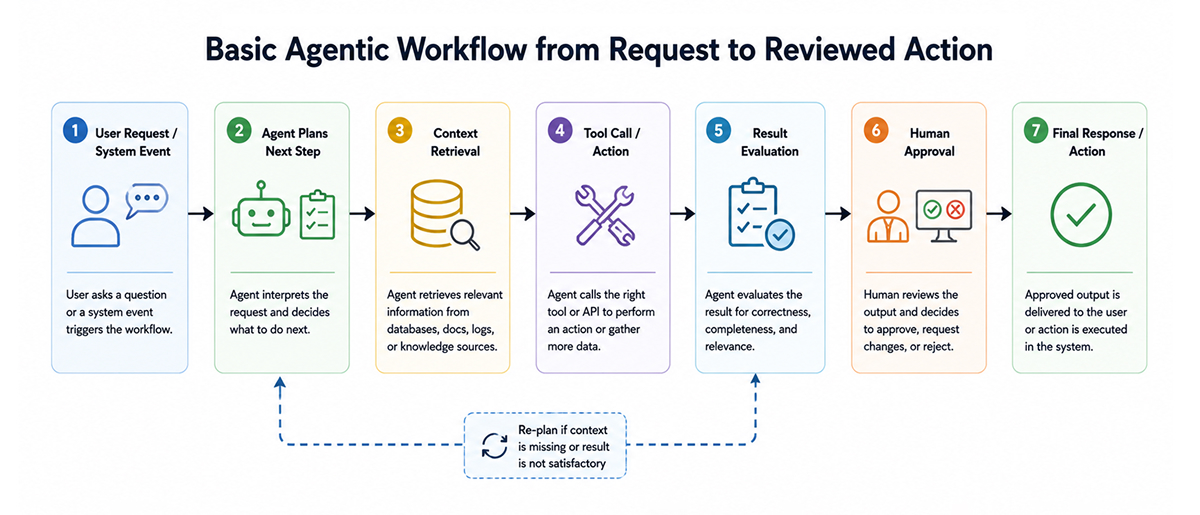
This is the line that matters in production. The agent can reason and assist, but the system still needs boundaries. Tool access, logging, validation, retries, and escalation paths are part of the design. Without them, AI agent workflows become hard to debug and risky to operate.
Prompt Chaining Pattern
Prompt chaining breaks a larger task into smaller sequential steps. Each step has a clear input and output, which makes the workflow easier to test and inspect.
Instead of asking a single model to “investigate this incident,” the system can split the task into stages. First, classify the alert. Then collect logs and metrics. Then summarize the evidence. Then suggest an action. Then, validate the output before showing it to an engineer.

This pattern works well when the task is structured but still needs reasoning inside each step. It is also easier to debug than a single long prompt. If the final answer is wrong, the team can inspect the chain to determine whether the issue stemmed from classification, retrieval, summarization, or validation.
Prompt chaining is usually a good starting point. It keeps the workflow controlled without removing the useful parts of the model.
Routing Pattern
Routing sends different user requests, task types, or data types to the right model, tool, workflow, or human reviewer. This matters when one entry point receives very different kinds of work.
A production support request may need log analysis. A billing request may need a workflow with limited data access. A security-related request may need human approval before the agent calls any tool. Routing keeps those paths separate instead of forcing everything through the same general workflow.

Without routing, the agent may use the wrong tool, apply the wrong policy, or treat a high-risk task like a normal support question. That is where production systems usually get messy. A simple routing layer can check the request type, the affected system, the data sensitivity, and the approval requirement before the workflow continues.
Routing does not need to be clever. It needs to be clear enough for engineers to understand why a task went down one path rather than another.
Parallelization Pattern
Parallelization runs independent checks or subtasks simultaneously. This is useful when the workflow needs broader coverage, but the checks do not depend on each other.
Before a production deployment, separate checks can inspect changes in dependencies, infrastructure diffs, failed tests, security signals, and observability gaps. Running those checks in parallel can reduce review time and catch issues that one broad review might miss.

This is one of the more practical agentic patterns for engineering teams because it improves speed without giving the agent too much freedom. Each check stays narrow. The final workflow combines the findings and shows the result to the right person or gate.
The main risk is conflict. One check may say the release looks safe, while another finds a weak rollback plan. The workflow should surface that disagreement clearly. It should not bury it inside a polished summary.
Orchestrator-Worker Pattern
The orchestrator-worker pattern uses one coordinating agent to assign work to specialized worker agents. The orchestrator understands the goal, breaks the task into parts, and gathers results from each worker.
This pattern is useful when the work spans several domains. A production readiness review may require one worker for code changes, one for infrastructure, one for monitoring, and one for security. Each worker focuses on a narrow part of the job.

The main benefit is the separation of responsibility. A code review agent does not need cloud admin permissions. A security review agent does not need to rewrite application logic. Each worker can have their own tools, limits, and output format.
The danger is making the system too complex. Too many agents can create more operational overhead than the task itself. The orchestrator should coordinate the workflow, while the workers stay focused and limited.
Evaluator-Optimizer Pattern
The evaluator-optimizer pattern is a review loop. One part of the workflow creates the first version of the answer, and another part checks it before it moves forward. That reviewer might be another model, a rule-based check, a test runner, or a mix of all three.
This is useful when the first output sounds fine but still needs pressure testing. Runbooks, incident notes, deployment recommendations, and customer replies can all look clean while missing evidence or making a risky assumption.
The evaluator should look for practical problems: missing context, policy gaps, weak reasoning, unsafe wording, or output that is not sufficiently complete to use. If something is off, the workflow sends feedback back to the generator and asks for a better version.

This does not make the system perfect. A second model can still miss something. For production use, model-based evaluation should be placed alongside deterministic checks where possible. Schema validation, tests, policy gates, dry runs, and permission checks still matter.
Human-in-the-Loop Pattern
Human-in-the-loop design adds human approval at the points where automated action becomes risky. This is essential for high-risk agentic AI workflow design patterns involving money, security, compliance, production changes, or customer impact.
The approval step should not be a vague button labeled “approve” or “reject”. Engineers need the details. What context did the agent use? Which tools did it call? What action is it suggesting? What is the risk if it is wrong?
For example, an agent can prepare a rollback command, but an engineer should approve it before execution. An agent can draft a customer response, but a support lead may need to review it when legal or account risk is involved.

Human review also helps when the workflow is uncertain. If context is missing, tool outputs conflict, or the request falls outside policy, escalation is better than guessing. A safe workflow treats uncertainty as a normal state, not as something the model needs to hide.
How to Choose the Right Agentic Workflow Pattern
The right pattern depends on the task. A simple classification workflow does not need multiple agents. A cross-system incident investigation might. The decision should be based on task complexity, risk level, latency requirements, cost, evaluation clarity, and the system’s actual autonomy needs.
Use prompt chaining when the path is known and repeatable. Use routing when requests are split into different categories or risk levels. Use parallelization when several independent checks need to run simultaneously. Use orchestrator-worker when the task crosses multiple domains. Use evaluator-optimizer when output quality needs another pass. Use human-in-the-loop when the action can affect production, customers, money, security, or compliance.

The mistake is trying to make every workflow highly autonomous from the start. Most teams get better results by starting narrow, measuring behavior with platforms like Milestone, and adding autonomy only where it removes real operational work without hiding risk.
Good patterns should make the system easier to reason about. If the workflow is harder to operate than the manual process it replaced, it probably needs to be simplified.
Conclusion
Production-ready agentic systems work best when teams start simple. A prompt chain with good logging may be more useful than a complex multi-agent setup that nobody can debug.
Add autonomy slowly. Use routing, parallel checks, evaluators, and human approval where the workflow needs them. The strongest agentic patterns combine model reasoning with monitoring, validation, and clear human oversight.
FAQs
1. What are the most common agentic workflow design patterns for production systems?
The most common patterns are prompt chaining, routing, parallelization, orchestrator-worker, evaluator-optimizer, and human-in-the-loop. Production systems often combine them. For example, an incident workflow may route the alert, run parallel checks, evaluate the summary, and ask for human approval before a risky action.
2. How do you choose between different agentic workflow patterns for your use case?
Look at how fixed the task is and what can go wrong. If the steps are known, prompt chaining is usually enough. Mixed request types need routing. Independent checks can run in parallel. Once the work crosses teams or affects users, add an orchestrator, evaluator, or human review.
3. What are the key differences between reactive and proactive agentic patterns?
Reactive patterns wait for something to happen: a ticket, an alert, a user prompt, or a failed check. Proactive patterns watch the environment and start work on their own, such as flagging drift or suggesting a fix. They can be useful, but easy to overdo when signals are weak.
4. How do you implement error handling in agentic workflows?
Treat failures as part of the workflow, not as strange edge cases. Validate structured output, retry tool timeouts, and stop loops that keep repeating the same step. When context is thin or the risk is high, send it to a person. Guessing quietly is the dangerous path.
5. What monitoring strategies work best for agentic workflow systems?
Track workflow completion, step latency, retries, tool failures, approval rates, rejected outputs, blocked actions, and cost per task. Also, log prompts, retrieved context, tool inputs, tool outputs, and final decisions where policy allows. Monitoring should help engineers understand behavior, not just uptime.