Kiro · Integration Guide
Kiro writes usage and prompt telemetry to an S3 bucket in your own AWS account; Milestone reads it. There's nothing to paste here — set up the bucket and exports below, then give Milestone read access to the bucket and to your Identity Center directory.
Kiro only emits records for users who sign in via IAM Identity Center. Builder ID / Google logins produce zero records, even when the bucket is wired up correctly.
1. Create an S3 bucket for Kiro logs
Create the bucket in the AWS account where your Kiro users are subscribed, in the same region as the Kiro profile. When you set the S3 location in step 2, the Kiro console shows the bucket policy that lets Kiro write — apply it.
2. Point both Kiro exports at the bucket
In the Kiro console, under Settings, enable both exports and set their S3 locations. Use a different folder for each so they don't overlap. Note the exact location you give prompt logging — you'll share it with Milestone in step 3. Kiro appends AWSLogs/<account>/KiroLogs/… underneath whatever folder you choose.
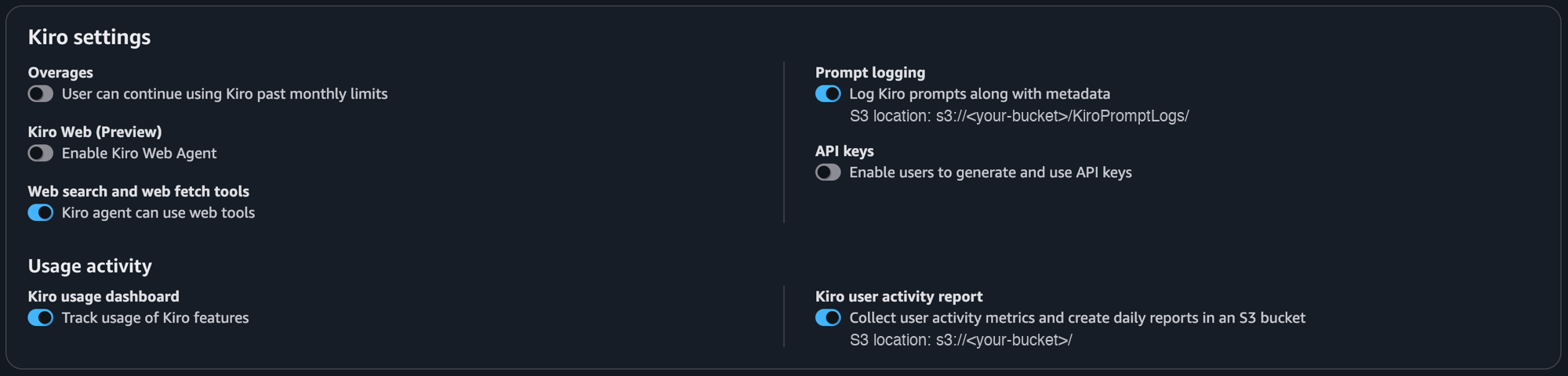
| Export | S3 location |
|---|---|
| Kiro user activity report | s3://<your-bucket>/<activity-folder>/ |
| Prompt logging | s3://<your-bucket>/<prompt-log-folder>/ |
3. Give Milestone read access to the bucket
How the bucket gets read depends on where your Milestone deployment runs:
Self-hosted — Milestone runs in your AWS account
Grant the Data Collection Agent's own IAM role (IRSA or instance profile) s3:ListBucket and s3:GetObject on the bucket. It reads the data from within your account — there's nothing to send us.
Identity policy for the DCA role
{
  "Version": "2012-10-17",
  "Statement": [
    {
      "Effect": "Allow",
      "Action": ["s3:GetObject", "s3:ListBucket"],
      "Resource": [
        "arn:aws:s3:::<kiro-bucket>",
        "arn:aws:s3:::<kiro-bucket>/*"
      ]
    }
  ]
}
Milestone-hosted (SaaS)
Milestone's collector runs in our AWS account, so it needs cross-account read access. Contact your Milestone representative for the IAM principal to allow in your bucket policy, then share your bucket name, AWS account ID, region(s), and the prompt-log folder from step 2 (if it differs from the activity report's).
Bucket policy (principal from Milestone)
{
  "Version": "2012-10-17",
  "Statement": [
    {
      "Effect": "Allow",
      "Principal": { "AWS": "<principal-arn-provided-by-milestone>" },
      "Action": ["s3:GetObject", "s3:ListBucket"],
      "Resource": [
        "arn:aws:s3:::<kiro-bucket>",
        "arn:aws:s3:::<kiro-bucket>/*"
      ]
    }
  ]
}
4. Grant directory access for per-developer attribution
Kiro telemetry identifies users only by an opaque IAM Identity Center id — no email or name. So Milestone can attribute usage to individual developers, grant read-only access to your Identity Center directory: a role in your management or delegated-admin account allowing identitystore:ListUsers (and sso:ListInstances), assumed by Milestone's collector with an ExternalId — no static keys. Your Milestone contact will provide the principal ARN and ExternalId values.
Permission policy on the directory-read role
sso:ListInstances can be dropped if you supply the Identity Store ID (d-…) explicitly.
{
  "Version": "2012-10-17",
  "Statement": [
    {
      "Effect": "Allow",
      "Action": ["identitystore:ListUsers", "sso:ListInstances"],
      "Resource": "*"
    }
  ]
}
Trust policy on that same role
For Milestone-hosted (SaaS), the principal ARN and ExternalId are provided by Milestone during onboarding — the ExternalId is required there (confused-deputy protection). For a customer-run DCA, the principal is the role the DCA resolves to; in that cross-account case the DCA's base role also needs an identity policy allowing sts:AssumeRole on this role's ARN — trust alone is sufficient only same-account.
{
  "Version": "2012-10-17",
  "Statement": [
    {
      "Effect": "Allow",
      "Principal": { "AWS": "<DCA-principal-ARN>" },
      "Action": "sts:AssumeRole",
      "Condition": { "StringEquals": { "sts:ExternalId": "<ExternalId>" } }
    }
  ]
}
Need help? See the Kiro monitoring docs.