Deployment on Kubernetes
Download this guide as a PDF for printing or offline reading.
This guide walks a customer platform engineer through installing the Milestone Data Collection Agent (DCA) on a customer-managed Kubernetes cluster via Helm. The DCA collects engineering data from your source-control, project-management, and AI-coding tools and uploads it to Milestone. It runs entirely in your cluster; the only outbound traffic is to the systems it collects from and the Milestone upload endpoint.
By the end you will have:
- A namespace, image-pull credentials, and (recommended) KEDA in place.
- A
values.yamlgenerated by the setup wizard or written by hand. - The DCA Helm chart installed, pods healthy, and a preflight check passing.
How to read this guide. Numbered sections and the commands in them are the steps to run, in order. The shaded boxes are context, not steps — a Why this matters box explains the reasoning behind a step; other boxes flag a gotcha or an option. You can install by following only the numbered steps, and read the boxes when you want the "why."
Just need a single collector on one machine? The agent can also run on a single VM via Docker Compose, which is simpler to operate. A separate VM installation guide is available — ask your Milestone representative for it. Use this Kubernetes guide when you already run Kubernetes, want scale-to-zero workers, or are standing up multiple tenants.
What Milestone provides
Before you start, Milestone will send you, via 1Password secure share: your
tenant name and tenant ID, a read-only Docker Hub username/password
(for both the image pull and the chart pull), the upload API URL and API key,
and the chart/image version to install. This guide uses 1.4.2 as a
placeholder version and milestone-dca as the namespace and release name — adapt
to your conventions.
Architecture
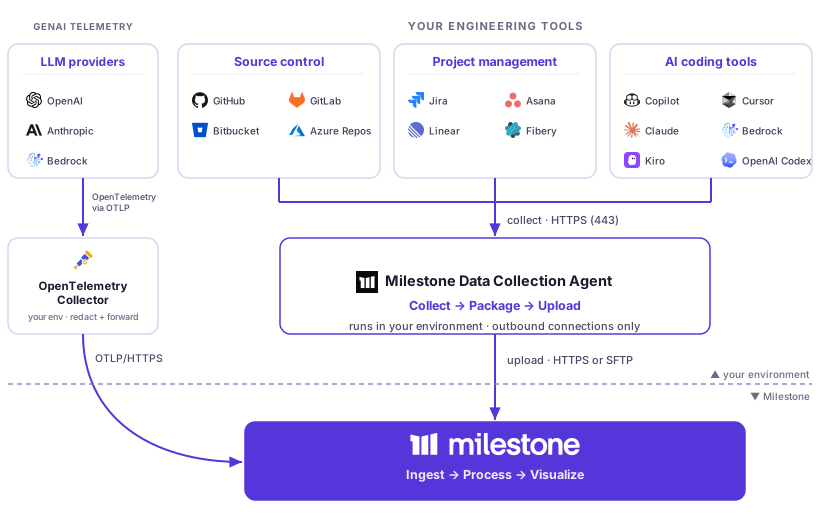
The agent runs entirely inside your environment and makes only outbound connections — it collects from your engineering tools, packages the data, and uploads it to Milestone, which ingests it and surfaces it in your dashboard.
1. Prerequisites
1.1 Kubernetes cluster and namespace
- A Kubernetes cluster at version ≥ 1.24 (Helm rejects the install otherwise —
Chart.yamldeclares this constraint). - Helm 3.10+ on the workstation running the install (required for OCI chart pulls).
- A dedicated namespace. Suggested:
milestone-dca. - Namespace-admin access for whoever runs
helm install.
1.2 KEDA — strongly recommended
Install KEDA cluster-wide if you don't already run it:
helm repo add kedacore https://kedacore.github.io/charts
helm repo update
helm install keda kedacore/keda -n keda-system --create-namespace
Verify:
kubectl get pods -n keda-system
kubectl get crd scaledobjects.keda.sh
If KEDA is genuinely not an option, talk to us — we can discuss alternatives.
Why this matters: the agent's worker types are heavily idle between collection runs. KEDA scales them to zero when there's no work and bursts them up during collection (
gitHeavyWorker.replicas: 0is the default). Without KEDA you must set static replicas that run 24/7 — for four concurrent git-heavy workers, roughly 10× the steady-state compute cost.
The chart enables KEDA scaling via
autoscaling.enabled: true. If you leave that off without setting staticreplicas, no git-heavy work will run. Either install KEDA and enable autoscaling, or set static replicas explicitly.
1.3 Pre-engagement: send us your cluster details
Run these commands and send the output to Milestone before scheduling the install:
kubectl get sc                                            # StorageClasses available
kubectl get crd scaledobjects.keda.sh                     # KEDA installed?
kubectl get crd servicemonitors.monitoring.coreos.com     # Prometheus Operator installed?
kubectl get priorityclass                                 # existing PriorityClasses
kubectl version --short                                   # cluster version
The output tells us which StorageClass names to use, whether to enable KEDA autoscaling and Prometheus integration, and whether to reference any PriorityClasses you already have.
1.4 StorageClasses
The chart requires two StorageClasses available to the namespace:
- One ReadWriteOnce (RWO) — for the coordinator's local state (SQLite + work
queue). E.g.
gp3on AWS,pd-standardon GCP. Wired viapersistence.storageClass. - One ReadWriteMany (RWX) — for shared worker storage (outbox, refs cache,
blame checkpoints). E.g.
efs-scon AWS,filestore-csion GCP, NFS elsewhere. Wired viadistributed.sharedStorage.storageClass.
The RWX class must be backed by a real shared POSIX filesystem, not merely
accept ReadWriteMany in its PVC spec. Concretely:
- Cross-pod visibility — a file written by one pod must become readable from every other pod promptly. Worker pods hand collected artifacts to the coordinator through this volume; if the coordinator can't see them, every artifact is dropped after the upload retry budget.
- Ownership honors the pod's
fsGroup— files must be created owned by the pod's uid/gid (the chart runs everything as1000/1000), and setting explicit timestamps on them must work. Volumes that squash ownership (NFS exports withroot_squash, CIFS/SMB, CSI drivers that ignorefsGroup) fail the preflight — squashed ownership marks a volume whose POSIX semantics can't be trusted. (Before chart 1.5.8 it also broke collection outright with[Errno 1] Operation not permitted.)
EFS, Filestore, and NFS exported with no_root_squash qualify. CIFS/SMB does
not. An RWO class that happens to bind per-pod does not.
If you only have RWO available (common on small clusters, k3s/k3d, and clusters
without EFS/Filestore/NFS), set distributed.sharedStorage.enabled: false to run
in a degraded single-node mode for small installs — the chart drops the shared PVC
and runs workers without the cross-pod outbox/refs cache.
Why this matters: a defective RWX volume is worse than no RWX volume — the agent looks healthy while every worker-produced artifact is silently dropped. To catch this, the chart runs an RWX preflight hook Job on every
helm install/upgrade: one pod writes a canary file, a second pod (on another node where possible) must see it and set explicit timestamps on it. The install fails loudly if the volume misbehaves — see Troubleshooting. Gated bydistributed.sharedStorage.preflight.enabled(defaulttrue).
If the chart's default-on
distributed.sharedStoragereferences an RWO-only StorageClass,helm installreportsSTATUS: deployedbut every pod sits inPendingindefinitely, with the shared PVC stuck onProvisioningFailed: ... only supports ReadWriteOnce. Flip the flag tofalseif you see this.
1.5 Container image — pick one
The DCA image is private. Both options below require a
kubernetes.io/dockerconfigjson secret in the install namespace, and a matching
imagePullSecrets entry in your values file. Without it the chart installs
cleanly but every pod stays in ImagePullBackOff. Step §2 has the exact
kubectl create secret docker-registry command — keep the secret name consistent
between §2 and your values.yaml (this guide uses milestone-dockerhub).
Option A (recommended): Mirror to your internal registry.
Mirror evno/milestone-data-collection-agent:<tag-we-provide> into your internal
container registry. Create the imagePullSecret in the milestone-dca namespace
pointing at your mirror. Send us the full image path and the secret name; we'll set:
image:
  repository: <your-registry>/milestone-data-collection-agent
  tag: ""              # empty -> uses chart appVersion; override to a custom tag if needed
imagePullSecrets:
  - name: milestone-dockerhub   # or whatever you named your dockerconfigjson secret
Option B: Docker Hub egress.
Whitelist outbound traffic to registry-1.docker.io from the namespace. We
provide a read-only Docker Hub username and password; you create the imagePullSecret with those
credentials (see §2).
You'll also need to pull the Helm chart itself — either from Docker Hub directly
(oci://registry-1.docker.io/evno/data-collection-agent) or by mirroring the
chart artifact to a registry of your choice (helm pull + helm push). The
chart-pull credential is stored separately by helm registry login (in
~/.config/helm/registry/config.json); the imagePullSecret covers only the
runtime image pull.
1.6 Egress allowlist
The DCA pods need outbound HTTPS (port 443) from the namespace to:
- Container image registry —
registry-1.docker.io(Option B in §1.5) or your internal mirror (Option A). - Milestone upload endpoints — two hosts, both required:
upload.mstone.ai— the presigned-URL service. The agent calls this to get a short-lived URL.milestone-data-collection.s3.us-east-1.amazonaws.com— the S3 bucket the presigned URL points at. Allowing only the presign service is not enough; without S3 egress the upload step fails.
- Your git provider APIs — e.g.
api.github.com(or your GitHub Enterprise host),gitlab.com(or self-hosted),api.bitbucket.org, your Azure DevOps org. - Atlassian (if using Jira) —
*.atlassian.net(or your Jira Data Center host). - Any GenAI tool endpoints you want telemetry from —
cursor.com,api.anthropic.com,api.github.com/copilot,api.openai.com.
If any of these endpoints (or a TLS-inspecting forward proxy in front of them) use a private CA, see §1.11.
1.7 Node capacity
At peak the chart requests approximately 34 CPU / 70 GiB memory in the
namespace (chart-documented numbers from values.yaml):
- 4× git-heavy workers — 32 CPU req / 64 GiB req / 128 GiB limit
- Baseline (coordinator + 2 api-fast + 2 api-slow + github-pr) — ~2 CPU req / 6 GiB req / 12 GiB limit
- ~30% headroom for rolling updates
With KEDA, git-heavy pods exist only during collection windows; without KEDA, they
need to be statically provisioned (see §1.2). Either way, the cluster needs that
headroom during peaks. On AWS this is roughly 2× m5.4xlarge. If your cluster
can't sustain that, tell us — we can lower the ceiling at the cost of slower
historical backfills (set autoscaling.gitHeavyWorker.maxReplicas below 4).
1.8 Credentials and configuration
All credentials currently used by the agent (provider tokens, API keys, PEM files)
are loaded into a single Kubernetes Secret in the namespace at install time,
never stored on disk. The secret keys are mounted at /secrets/* inside the pods
and referenced by tokenFile: paths in the values file.
Non-secret configuration (tenant name, org lists, backfill start date, endpoint
URLs) goes into the Helm values file (values.yaml).
The secret is either created manually before install:
kubectl create secret generic milestone-dca-tokens \
  --namespace milestone-dca \
  --from-literal=github-token='ghp_...' \
  --from-literal=presign-api-key='...'
…or, on clusters that already run External Secrets Operator, synced from your
secret backend by setting externalSecret.enabled: true.
1.9 Optional: Prometheus integration
If you run the Prometheus Operator, the chart registers a ServiceMonitor so
your Prometheus scrapes the coordinator's /metrics endpoint automatically.
serviceMonitor.enabled is true by default.
If you do not run the Prometheus Operator, you must turn this off explicitly —
otherwise helm install will fail because the ServiceMonitor CRD doesn't exist:
serviceMonitor:
  enabled: false
There's no hard runtime dependency either way; the agent works fine without Prometheus.
1.10 Optional: PriorityClasses (eviction hierarchy)
The chart defaults priorityClassName and coordinatorPriorityClassName to empty
strings. DCA pods run at the cluster default priority (0) — same as the rest of
your unmarked workloads. The agent works correctly at default priority. You only
need this section if you want preferential scheduling under node pressure.
The DCA coordinator owns the SQLite work queue that all workers depend on; if it's
evicted, every worker stalls until it restarts (~15-30s, no data loss — work
resumes from the queue when workers re-claim). On a busy shared cluster this small
interruption can repeat several times during peaks. Setting
coordinator > worker > 0 priorities lets the coordinator outlive workers under
node pressure, which smooths these interruptions.
To opt in:
1. A cluster-admin creates two cluster-scoped PriorityClass resources (this
requires cluster-admin, not just namespace-admin). Suggested values, well below the
Kubernetes-reserved range, both with globalDefault: false so they don't change
unmarked workloads:
apiVersion: scheduling.k8s.io/v1
kind: PriorityClass
metadata:
  name: batch-coordinator
value: 5000
globalDefault: false
description: "DCA coordinator: manages the work queue that all workers depend on."
---
apiVersion: scheduling.k8s.io/v1
kind: PriorityClass
metadata:
  name: batch-processing
value: 1000
globalDefault: false
preemptionPolicy: Never
description: "Batch/async workloads: DCA workers. Never preempts other workloads."
2. Reference them in your values.yaml:
priorityClassName: batch-processing
coordinatorPriorityClassName: batch-coordinator
You can name the PriorityClasses whatever fits your cluster's existing naming convention — both fields take any name your cluster has registered.
If you change your mind later: kubectl delete priorityclass batch-coordinator batch-processing removes them; existing pods using them keep running, and a
helm upgrade with the values cleared returns DCA to default priority.
1.11 Optional: Custom CA bundle for private PKI
customCABundle.enabled defaults to false. The chart trusts the public root CAs
shipped in the base image (Debian's ca-certificates). Skip this section if
every endpoint DCA talks to — your git provider, Jira, the GenAI APIs, the
Milestone presign service, and S3 — uses a publicly-trusted certificate. That
covers github.com, gitlab.com, *.atlassian.net, cursor.com,
api.anthropic.com, api.openai.com, upload.mstone.ai, and
*.s3.amazonaws.com.
Turn it on if any of these apply:
- Self-hosted git provider (GitHub Enterprise Server, self-hosted GitLab, self-hosted Bitbucket Data Center) whose TLS cert is signed by your internal CA, not a public one.
- Self-hosted Jira (Data Center or Server) behind your internal CA.
- An internal S3-compatible endpoint (e.g. MinIO, Scality) or an internal Milestone-presign mirror.
- All cluster egress goes through a TLS-inspecting forward proxy that re-signs
HTTPS with your corporate CA. (Common in regulated industries; if you don't know
whether you have one, ask your network team — the symptom is that even
curl https://github.comfrom a pod returns an unknown-issuer error.)
Without this enabled in any of those scenarios, every DCA HTTPS call to the
affected endpoint fails with SSL: CERTIFICATE_VERIFY_FAILED: self-signed certificate in certificate chain and the collector logs the same row repeatedly.
To opt in:
1. Get the PEM bundle of your CA chain — root plus any intermediates needed to verify the endpoints DCA will talk to. One file, concatenated:
cat internal-root.pem internal-intermediate.pem > internal-ca-bundle.pem
2. Create a generic Secret in the install namespace holding the PEM. Use any
name you like; this guide uses milestone-dca-internal-ca:
kubectl create secret generic milestone-dca-internal-ca \
  --namespace milestone-dca \
  --from-file=ca.pem=internal-ca-bundle.pem
The key inside the Secret (ca.pem above) is the chart's default. You can use a
different key as long as you set customCABundle.secretKey to match — the chart's
schema constrains it to ^[A-Za-z0-9._-]+$, so keep it to letters, digits, dot,
underscore, dash.
3. Reference the Secret in your values.yaml:
customCABundle:
  enabled: true
  secretName: milestone-dca-internal-ca
  # secretKey: ca.pem   # default; uncomment only if you used a different key
After helm install / helm upgrade, every DCA pod gets a small init container
that concatenates the image's system CA bundle with your PEM into an emptyDir, and
the main containers point their TLS clients (httpx, requests, libcurl-via-git,
boto3) at the merged file. If the Secret is missing or the PEM is malformed, the
init container fails fast with a clear error rather than starting the main
container against a broken trust store.
Verify after install (substitute your release name; milestone-dca here):
kubectl exec -n milestone-dca deploy/milestone-dca-data-collection-agent-git-heavy-worker \
  -- sh -c 'wc -l "$SSL_CERT_FILE" && tail -30 "$SSL_CERT_FILE"'
The line count should be slightly higher than the image's stock bundle (one or two
extra -----BEGIN/END CERTIFICATE----- blocks for your root + intermediates), and
the tail should end with your CA's -----END CERTIFICATE-----.
To turn it off later, set customCABundle.enabled: false (or remove the block) in
values.yaml and helm upgrade. The init container and env vars disappear and
pods go back to the image's default trust store. You can delete the Secret
separately when you're sure no rollback is needed.
2. Authenticate with Docker Hub
Milestone shares a read-only Docker Hub username and password with you via 1Password (vault share or secure-share link) — that's the canonical channel; if you'd prefer something different, let us know before we send. The same credential is used in both places below.
Two distinct credential paths — both required. The imagePullSecret lets the
kubelet pull the runtime image; helm registry login lets your workstation pull
the chart artifact. Storing one does not cover the other.
# (a) For runtime image pulls — kubelet reads this when starting pods.
#     The `--docker-server=https://index.docker.io/v1/` value is canonical
#     and must be used verbatim, even if the image lives at registry-1.docker.io
#     or a mirror.
kubectl create secret docker-registry milestone-dockerhub \
  --namespace milestone-dca \
  --docker-server=https://index.docker.io/v1/ \
  --docker-username=<username> \
  --docker-password=<password>

# (b) For Helm chart pulls — used once at install time by your workstation.
helm registry login registry-1.docker.io -u <username>
Single-quote the password — --docker-password='<token>' — if your token contains
shell-special characters ($, !, backticks). An unquoted value can be mangled by
the shell, producing a malformed secret that fails the image pull with a
400 Bad Request from auth.docker.io.
The secret name (milestone-dockerhub above) must match the
imagePullSecrets[].name you set in §5. If you change the name, change it in both
places.
3. Pull the Helm chart
Replace 1.4.2 below with the version Milestone gives you. Released chart versions
are published as OCI artifacts on Docker Hub under evno/data-collection-agent;
the chart version always equals the DCA image version it ships with.
# Pull the chart from Docker Hub
helm pull oci://registry-1.docker.io/evno/data-collection-agent --version 1.4.2

# Or install directly (skip to step 6)
helm install milestone-dca oci://registry-1.docker.io/evno/data-collection-agent \
  --version 1.4.2 \
  --namespace milestone-dca \
  --create-namespace \
  -f values.yaml \
  --timeout 15m
Verify the chart signature (recommended)
Both the chart and the DCA image are signed with cosign using keyless OIDC — no signing keys to manage; the signature is bound to the GitHub Actions workflow that produced the artifact. Each release also has a SPDX SBOM attestation attached.
Verify the chart you pulled was built and signed by Milestone's release workflow:
cosign verify registry-1.docker.io/evno/data-collection-agent:1.4.2 \
  --certificate-identity-regexp 'https://github.com/evno-internal/milestone/\.github/workflows/helm-chart-dca\.yml@.+' \
  --certificate-oidc-issuer https://token.actions.githubusercontent.com
Verify the agent image (optional — your cluster's kubelet pulls it via the chart):
cosign verify evno/milestone-data-collection-agent:1.4.2 \
  --certificate-identity-regexp 'https://github.com/evno-internal/milestone/\.github/workflows/docker-data-collection-agent-release\.yml@.+' \
  --certificate-oidc-issuer https://token.actions.githubusercontent.com
Inspect the SBOM attestation (lists every package shipped in the chart or image):
cosign verify-attestation \
  --type spdxjson \
  --certificate-identity-regexp 'https://github.com/evno-internal/milestone/\.github/workflows/.+\.yml@.+' \
  --certificate-oidc-issuer https://token.actions.githubusercontent.com \
  registry-1.docker.io/evno/data-collection-agent:1.4.2
4. Configure — interactive wizard (recommended)
The agent includes an interactive setup wizard that generates a values.yaml and
setup-secrets.sh for your environment.
Run the wizard using the agent image:
docker run --rm -it -v $(pwd):/output \
  evno/milestone-data-collection-agent:1.4.2 \
  helm-setup --output /output
Use the same tag as the chart version you intend to install — they're released together.
This will prompt you for:
- Tenant name
- Presigned-URL upload credentials (
apiUrl,tenantId, and API key — Milestone provides all three) - Git providers — GitHub (incl. GitHub App), GitLab, Bitbucket, Azure Repos
- Jira (cloud or data-center) and project-management integrations (Asana, Linear)
- GenAI tools — GitHub Copilot, Cursor, Anthropic (Claude), OpenAI Codex, AWS Bedrock, Kiro, AWS Identity Center (directory, for IdC-id resolution)
- Worker scaling preferences (KEDA / static replicas)
Output:
values.yaml— Helm values for your deploymentsetup-secrets.sh— script to create the integration-tokens Kubernetes Secret (milestone-dca-tokens) only.
The wizard does NOT create the image-pull Secret. You still need to run the
kubectl create secret docker-registrycommand from §2 separately, or pods will hitImagePullBackOffafter §6.
5. Configure — manual (alternative)
If you prefer to configure manually, create a values.yaml:
tenantName: "your-company"

image:
  repository: evno/milestone-data-collection-agent
  # Leave empty to use the chart's appVersion (recommended — chart and image
  # are released together at the same version). Override only when mirroring
  # to a private registry with a non-matching tag.
  tag: ""
  pullPolicy: Always

imagePullSecrets:
  - name: milestone-dockerhub

secrets:
  tokenFile: milestone-dca-tokens   # must equal the Secret name you created (see §1.8 / §5)

upload:
  mode: presigned_url
  presignedUrl:
    apiUrl: "https://upload.mstone.ai"    # provided by Milestone
    tenantId: "your-tenant-id"            # provided by Milestone
    apiKeyFile: "/secrets/presign-api-key"

# Git providers
git:
  providers:
    - type: github
      apiServer: https://api.github.com
      tokenFile: /secrets/github-token
      orgs:
        - your-org

# Autoscaling (requires KEDA)
autoscaling:
  enabled: true
  gitHeavyWorker:
    maxReplicas: 4
  apiFastWorker:
    maxReplicas: 2
  apiSlowWorker:
    maxReplicas: 2
  cooldownSeconds: 300

# Shared storage (RWX required for distributed mode)
distributed:
  sharedStorage:
    enabled: true
    storageClass: "efs-sc"    # your RWX StorageClass
    size: 50Gi

# Disable Datadog (not needed for customer deployments)
datadog:
  enabled: false
The secrets.tokenFile value must equal the Secret name you create below (and in
§1.8). The chart only mounts /secrets/* when it is set — leave it empty and every
tokenFile / apiKeyFile path resolves to nothing, so agent preflight fails on
missing secret files even though the Secret exists.
Create secrets manually:
NAMESPACE=milestone-dca
RELEASE=milestone-dca

kubectl create namespace "$NAMESPACE" --dry-run=client -o yaml | kubectl apply -f -

kubectl create secret generic "$RELEASE-tokens" \
  --namespace "$NAMESPACE" \
  --from-literal=github-token='ghp_...' \
  --from-literal=presign-api-key='...' \
  --dry-run=client -o yaml | kubectl apply -f -
6. Install
# If you ran the wizard, create secrets first
bash setup-secrets.sh

# Install the chart (replace 1.4.2 with the version Milestone gave you)
helm install milestone-dca oci://registry-1.docker.io/evno/data-collection-agent \
  --version 1.4.2 \
  --namespace milestone-dca \
  --create-namespace \
  -f values.yaml \
  --timeout 15m
7. Verify
# Check pods are running
kubectl get pods -n milestone-dca

# View coordinator logs
kubectl logs -n milestone-dca deploy/milestone-dca-data-collection-agent-coordinator -f

# Run preflight checks (verifies connectivity before first scheduled run)
kubectl exec -n milestone-dca deploy/milestone-dca-data-collection-agent-coordinator -- \
  agent preflight -c /config/config.yaml

# Health check
kubectl port-forward -n milestone-dca deploy/milestone-dca-data-collection-agent-coordinator 8080:8080 &
curl -s http://localhost:8080/health
curl -s http://localhost:8080/status | jq .
Verify KEDA autoscaling
# Check ScaledObjects are created
kubectl get scaledobjects -n milestone-dca

# Workers should be at 0 replicas when idle
kubectl get deploy -n milestone-dca

# After the first scheduled run, workers should scale up
kubectl get pods -n milestone-dca -w
That completes the installation: sections 1–7 above are all you need to get the agent running.
✅ Installation complete. If the §7 checks pass, the agent is installed and collecting. Everything below is reference for after install — you don't need it to finish setting up; come back to it as needed.
After installation
8. Upgrades
# Upgrade to a new chart version
helm upgrade milestone-dca oci://registry-1.docker.io/evno/data-collection-agent \
  --version <new-version> \
  --namespace milestone-dca \
  -f values.yaml \
  --timeout 15m
The coordinator uses a Recreate deployment strategy (required for SQLite single-writer consistency). During upgrades there is a brief downtime — no data is lost, and workers resume from their last checkpoint.
Rollback
# List release history
helm history milestone-dca -n milestone-dca

# Rollback to a previous revision
helm rollback milestone-dca <revision> -n milestone-dca
Dry-run
Preview changes before applying:
helm upgrade milestone-dca oci://registry-1.docker.io/evno/data-collection-agent \
  --version <new-version> \
  --namespace milestone-dca \
  -f values.yaml \
  --dry-run --diff
9. Optional features
These features are disabled by default and can be enabled in your values.yaml.
PodDisruptionBudget
Protects the coordinator from eviction during node drains (recommended for production):
podDisruptionBudget:
  enabled: true
  minAvailable: 1
Ingress
Expose the coordinator's health/status endpoints externally:
ingress:
  enabled: true
  className: "nginx"  # or "alb", "traefik", etc.
  hosts:
    - host: dca.example.com
      paths:
        - path: /
          pathType: Prefix
NetworkPolicy
Restrict network traffic to/from DCA pods (allows only required ports):
networkPolicy:
  enabled: true
Prometheus ServiceMonitor
Enable Prometheus scraping of the coordinator's /metrics endpoint (requires
Prometheus Operator):
serviceMonitor:
  enabled: true
  additionalLabels:
    release: prometheus  # match your Prometheus Operator's label selector
10. Troubleshooting
Pods stuck in ImagePullBackOff
kubectl describe pod -n milestone-dca <pod-name>
Look for Failed to pull image ... pull access denied, repository does not exist or may require authorization. The DCA image is private; the kubelet cannot pull
it without an imagePullSecret. Three things must all line up:
- A
kubernetes.io/dockerconfigjsonsecret exists in the install namespace (created by §2). imagePullSecrets[].namein yourvalues.yamlmatches that secret's name (set in §5 and shown inhelm get values milestone-dca).- The credential in the secret has read access to the image repository
(
evno/milestone-data-collection-agentfor Option B; your mirror for Option A).
The most common cause is the wizard path — running bash setup-secrets.sh only
creates the integration-tokens Secret, not the image-pull Secret. Re-run the
§2 command and re-roll the pods (kubectl rollout restart deploy -n milestone-dca).
Workers stuck in Pending
Check if KEDA is installed and ScaledObjects are healthy:
kubectl get scaledobjects -n milestone-dca
kubectl describe scaledobject <name> -n milestone-dca
Common causes:
- KEDA not installed — see §1.2.
- Insufficient cluster resources — check
kubectl describe pod <pending-pod>. - StorageClass issues — verify your RWX StorageClass exists:
kubectl get sc. Ifkubectl describe pvc -n milestone-dca milestone-dca-data-collection-agent-sharedshowsProvisioningFailed: ... only supports ReadWriteOnce, your cluster's StorageClass doesn't support RWX — either install one (NFS / EFS / Filestore) or setdistributed.sharedStorage.enabled: falseandhelm upgradeto run in single-node degraded mode (see §1.4).
RWX preflight hook failures
If helm install/upgrade fails on the <release>-data-collection-agent-rwx-preflight hook Job, the
shared RWX volume misbehaves in a way that silently drops collected data.
The failed Job is kept for inspection:
kubectl logs -n milestone-dca -l job-name=milestone-dca-data-collection-agent-rwx-preflight --prefix
The pod logs state which defect was detected:
- "squashes ownership" — files land owned by the wrong uid, or explicit
timestamps raise
EPERM. Fix the volume: removeroot_squashfrom the NFS export (no_root_squash), don't use CIFS/SMB, and ensure your CSI driver honorsfsGroup(the chart setsfsGroup: 1000). - "never became visible" — either the writer pod couldn't schedule/pull
the image within the reader's wait (check
kubectl get pods -n milestone-dca -l app.kubernetes.io/component=rwx-preflightfor aPending/ImagePullBackOffpeer), or a file written by one pod genuinely can't be seen from another — the StorageClass is not a shared filesystem (often an RWO volume bound per-pod). Switch to EFS / Filestore / NFS. - "reader pod never confirmed" — the mirror image: the reader couldn't schedule/pull in time, or the same visibility problem.
If instead helm itself aborts with a generic timed out waiting for the condition, the hook never got to run its checks — helm's default --timeout
is 5m and cold image pulls can exceed it. Re-run with --timeout 15m (safely
above the hook's own 10-minute ceiling) rather than treating it as a volume
verdict.
Re-run the check with helm upgrade after fixing the volume. If the volume
genuinely can't be fixed (e.g. CIFS-only storage), fall back to single-node
degraded mode (distributed.sharedStorage.enabled: false, §1.4) instead. The
hook can be disabled with distributed.sharedStorage.preflight.enabled: false,
but a volume that fails the visibility check will lose git/PR/jira data
even though the agent looks healthy — don't disable it to make an install pass.
Preflight check failures
kubectl exec -n milestone-dca deploy/milestone-dca-data-collection-agent-coordinator -- \
  agent preflight -c /config/config.yaml
This checks: secret files, upload connectivity, git provider auth, and Jira reachability.
SSL: CERTIFICATE_VERIFY_FAILED in collector logs
Collector pod logs contain something like:
SSLError: [SSL: CERTIFICATE_VERIFY_FAILED] certificate verify failed: self-signed certificate in certificate chain
— and the same row repeats every cycle. This means DCA is trying to verify a TLS certificate signed by a CA the image's trust store doesn't know about. Most often: a self-hosted git provider, a self-hosted Jira/Bitbucket, an internal S3 endpoint, or a TLS-inspecting forward proxy in front of all egress. See §1.11 for how to mount your private CA bundle into the pods.
No data being collected
Check the coordinator status endpoint:
kubectl port-forward -n milestone-dca deploy/milestone-dca-data-collection-agent-coordinator 8080:8080 &
curl -s http://localhost:8080/status | jq .
Look for next_run_at timestamps in flow schedules. The first run triggers
according to the cron schedule in values.yaml.
11. What happens next
Once pods are healthy and the preflight check passes, the agent collects on its
flow schedules and uploads to Milestone, which ingests the data and surfaces it in
your Milestone dashboard — no further action in the cluster is required. Use the
/status endpoint (§7) to see when each collector last ran and when it runs next,
and (if you enabled it in §1.9) your Prometheus scrape of /metrics for ongoing
health. If data doesn't appear in the dashboard within the expected window, work
through §10 starting with No data being collected, then contact your Milestone
representative with the agent preflight output and curl -s .../status.
Questions or a non-standard environment? Contact your Milestone representative before installing.